Every year, Android users eagerly wait to see what’s next from Google—and 2026 is no exception.
With the release of the third beta version of Android 17, we’re now getting a clearer picture of what the future of Android looks like. This latest update isn’t just about new features—it reflects a deeper shift toward privacy, adaptability, and long-term security.
From smarter permissions to better support for foldable devices, Android 17 signals a more mature and refined operating system.
In this in-depth guide, we’ll explore everything you need to know about Android 17, including its features, improvements, release timeline, and whether you should install it now.
What Is Android 17 Beta?
Android 17 Beta is a pre-release version of Google’s next mobile operating system. It’s designed primarily for developers, but early adopters can also try it to experience upcoming features before the official launch.
The third beta marks an important milestone:
Platform Stability
This means developers can now:
- Finalize app compatibility
- Optimize performance
- Prepare apps for release
In simple terms, Android 17 is now close to its final form.
Why Android 17 Matters
Android updates are no longer just about flashy features. Instead, they focus on:
- User privacy
- Device flexibility (foldables, tablets)
- Security against modern threats
- Better integration with hardware
Android 17 embodies all of these priorities.
Major Privacy Improvements
Privacy continues to be a central theme in Android—and this version takes it even further.
One-Time Precise Location Access
Apps can now request one-time access to your exact location.
This means:
- No continuous tracking
- No background location abuse
- Full user control
This feature is especially useful for apps like:
- Ride-hailing
- Food delivery
- Maps
Automatic Password Protection
Android 17 introduces a subtle but powerful feature:
Automatic hiding of password keystrokes
Even when using a physical keyboard, your input is masked by default—reducing the risk of:
- Shoulder surfing
- Screen recording leaks
Stricter Local Network Access
Apps will now face tighter restrictions when accessing your local network.
This helps prevent:
- Unauthorized data access
- Hidden tracking attempts
- Malware exploitation
Post-Quantum Cryptography: Future-Proof Security
One of the most advanced additions in Android 17 is support for post-quantum cryptography.
What Does That Mean?
Traditional encryption could eventually be broken by quantum computers.
Post-quantum cryptography:
- Protects against future threats
- Ensures long-term data security
- Keeps your information safe even as technology evolves
It’s not something you’ll notice daily—but it’s a big deal for the future.
Camera and Media Enhancements
Android 17 also introduces improvements for photography enthusiasts.
RAW14 Image Format Support
The system now supports RAW14, a high-end image format.
Benefits include:
- More detail
- Better dynamic range
- Enhanced editing flexibility
This is particularly useful for:
- Professional photographers
- Content creators
- Mobile photography enthusiasts
Improved Bluetooth Features
If you use hearing aids or multiple audio devices, Android 17 makes things easier.
Separate Bluetooth LE Audio Controls
Users can now:
- Manage hearing aids independently
- Switch between devices more easily
- Enjoy better audio customization
Foldables and Tablets Get Smarter
Foldable devices are becoming more popular—and Android 17 is ready for them.
Automatic App Resizing
Apps will now:
- Automatically adapt to larger screens
- Adjust layouts dynamically
- Improve usability across devices
This is a major step toward making Android more device-agnostic.
Home Screen Customization
Minimalists will appreciate a new feature:
Hide app labels on the home screen
This creates:
- A cleaner look
- Less visual clutter
- A more modern interface
However, Google also recommends developers create distinct app icons to avoid confusion.
Under-the-Hood Improvements
Not all upgrades are visible—but they matter.
Read-Only Code Restrictions
Apps can no longer freely load executable code at runtime.
This helps:
- Prevent malware injection
- Improve app security
- Reduce system vulnerabilities
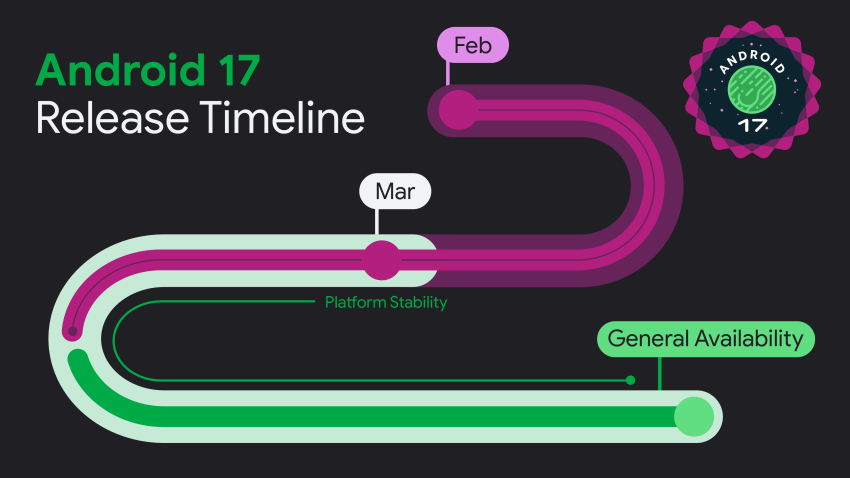
Android 17 Release Timeline
Here’s how the rollout has progressed:
- Feb 13, 2026 → First Beta
- Feb 26, 2026 → Second Beta
- March 2026 → Third Beta (Platform Stability)
Google is expected to showcase Android 17 at:
Google I/O 2026
May 19–20, 2026
Official Release
- Likely weeks after Google I/O
- Pixel devices first
- Other brands follow later
Which Devices Will Get Android 17?
Typically, updates roll out in this order:
- Google Pixel devices
- Flagship phones (Samsung, etc.)
- Mid-range devices
Android 17 vs Android 16
While Android 16 focused on foundational improvements, Android 17 builds on that with:
- Stronger privacy controls
- Better foldable support
- Advanced security features
Interestingly, Google may release a second major update later in 2026, just like Android 16.
Should You Install Android 17 Beta?
Install If:
- You’re a developer
- You want early access
- You enjoy testing new features
Avoid If:
- You need stability
- You rely on your phone daily
- You don’t want bugs
Pros and Cons
Pros
- Strong privacy features
- Future-proof security
- Better device adaptability
- Improved media capabilities
Cons
- Beta instability
- Limited device support
- Some features not user-visible
The Future of Android
Android 17 is more than just an update—it’s a glimpse into the future.
We’re seeing a shift toward:
- Privacy-first design
- AI-powered systems
- Cross-device compatibility
Conclusion
Android 17 is shaping up to be one of the most refined Android releases yet.
Instead of chasing flashy features, Google is focusing on what truly matters:
- Security
- Privacy
- Usability
And that’s exactly what users need in 2026.
Frequently Asked Questions (FAQ)
1. What is Android 17 Beta?
Android 17 Beta is a pre-release version of Google’s upcoming mobile OS. It allows developers and early users to test new features before the official rollout.
2. What does “platform stability” mean in Android 17?
“Platform stability” means the system APIs and core features are finalized. Developers can now safely optimize and publish apps for Android 17 without worrying about major changes.
3. What are the biggest new features in Android 17?
Some key highlights include:
- One-time precise location permissions
- Improved foldable and tablet support
- RAW14 image format support
- Better Bluetooth LE hearing aid controls
- Hidden app label option for home screen
4. How does Android 17 improve privacy?
Android 17 introduces:
- One-time location access for apps
- Automatic password keystroke hiding
- Stricter local network access rules
These features give users more control over their data.
5. What is RAW14 support in Android 17?
RAW14 is an advanced image format that captures more detail and dynamic range compared to standard formats, making it ideal for professional photography.
6. When will Android 17 be officially released?
Google is expected to release Android 17 officially shortly after its developer conference, Google I/O 2026 (May 19–20, 2026).
7. Which devices will get Android 17 first?
Typically, Google Pixel devices receive updates first, followed by brands like Samsung and others.
8. Is Android 17 available for all users now?
No, it’s currently in beta. Only developers and users who opt into the beta program can access it.
9. What is post-quantum cryptography in Android 17?
It’s a next-generation security feature designed to protect data against future threats from quantum computers.
10. Should you install Android 17 Beta?
Install it only if:
- You’re a developer
- You want to test new features early
Otherwise, it’s better to wait for the stable release to avoid bugs.