
The year 2026 marks a historic turning point in the relationship between software developers and integrated development environments. For decades, writing production-grade software required a rigorous, line-by-line manual syntax entry framework. Engineers spent hours managing dependencies, tracking down edge-case memory leaks, writing boilerplate metadata files, and fighting with inconsistent payment platform APIs.
At the landmark Google I/O 2026 conference, Google permanently updated this workflow. They did not just present incremental updates to their cloud infrastructure or consumer Android skins; they unveiled a massive, deeply integrated paradigm shift across the Android runtime, the Google Play Store network, and the Google Chrome web platform.
┌───────────────────────────────────────────────────────────────────────────┐
│                    Google I/O 2026 Developer Paradigm                     │
├───────────────────────────────────────────────────────────────────────────┤
│  1. Automated Stores  ──► AI acts as a 24/7 business management assistant.│
│  2. Vibe Coding       ──► Natural language transforms into direct source.│
│  3. WebMCP Protocol   ──► AI agents link directly to internal web APIs.   │
│  4. Immediate UI      ──► Passkey authentication combined into one frame. │
└───────────────────────────────────────────────────────────────────────────┘
This structural shift signals the dawn of professional Vibe Coding—an advanced development method where natural language prompts serve as the primary architecture for app generation, while underlying compilers, specialized AI assistants, and automated edge engines handle the heavy lifting.
For software engineers, product managers, independent creators, and digital entrepreneurs, these updates radically alter how apps are built, deployed, optimized, and monetized globally. This comprehensive technical guide breaks down Google’s new developer tools, exploring the software engineering, security frameworks, and technical infrastructure behind these updates.
The AI-Driven Play Store Ecosystem Autonomous Storefront Management
The business side of app distribution has long been a major bottleneck for independent developers and large app studios alike. Managing international App Store Optimization (ASO), tracking dynamic multi-tier subscription funnels, and reducing churn require extensive, continuous human effort.
Google’s new Play Store framework directly addresses these friction points by introducing an autonomous layer powered by Google Gemini. This turns the storefront into an active marketing and business management assistant.
                   [ The Autonomous Play Store Funnel ]
                                     │
   ┌─────────────────────────────────┼─────────────────────────────────┐
   ▼                                 ▼                                 ▼
[ Discovery Via Gemini ]    [ Ask Play Q&A Interface ]    [ Micro-Risk Grace Extensions ]
├── Contextual App Matching ├── On-Device Feature Audits ├── Latency Payment Evaluation
└── Direct Deep-Link Routing└── Local System Requirements └── Dynamic Retention Offers
1. Organic Conversational App Discovery
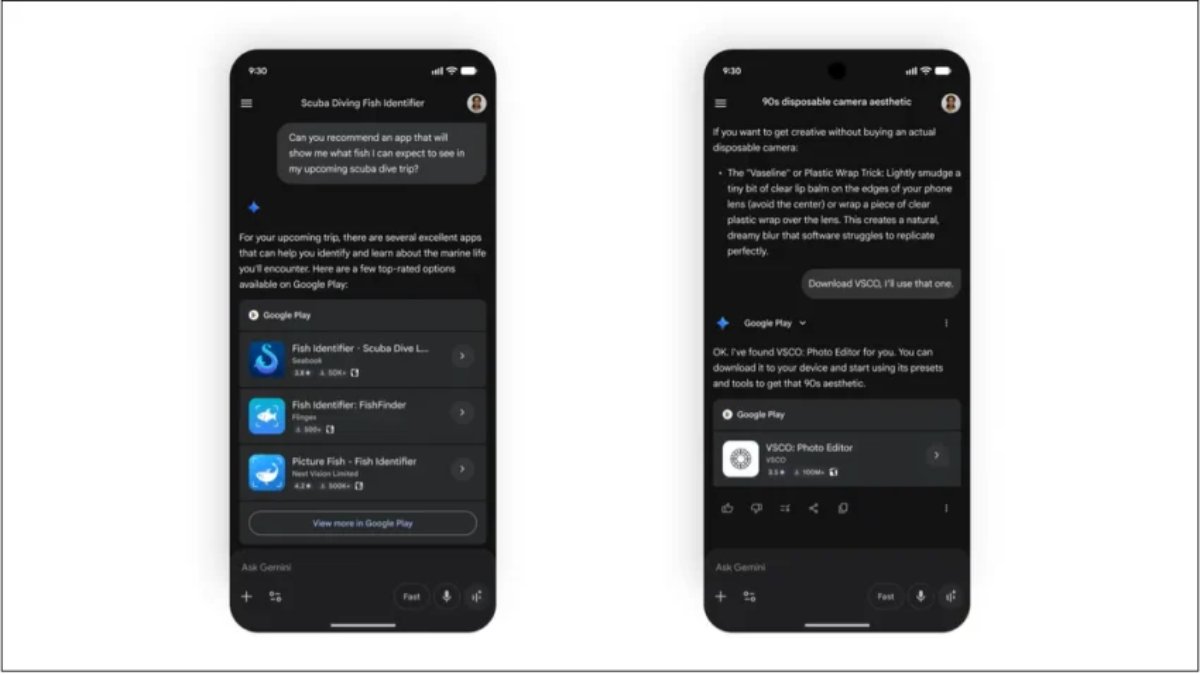
Traditional app search relies on rigid keyword matching, forcing developers to fight for specific phrases like “fitness tracker” or “budget manager.” With Google’s new platform updates, the search experience shifts to Intent-Based Conversational Discovery.
When a user asks Google Gemini a complex personal query—such as “I need an app that helps me log my morning runs, plays nicely with my local music files, and tracks my weekly progress without selling my data to third parties”—the model analyzes the entire query contextually.
It evaluates thousands of apps, matches their functional descriptions with the user’s intent, and delivers direct deep-link pathways straight to the corresponding Google Play Store installation pages. This rewards developers who build highly functional, precisely described apps rather than those who simply spam high-value keywords.
2. The Ask Play Q&A Interface
Once a potential customer lands on an app’s listing page, they no longer have to scroll through walls of user reviews or technical descriptions to see if the software meets their needs. The newly launched Ask Play Q&A interface gives users a direct chat window to inquire about an app’s specifics.
User Query: "Does this video editor support 4K 60fps exporting on a mid-range phone?"
                                      │
                                      ▼
[ Ask Play AI Engine ] ──► Audits App Spec Sheet & Manifest ──► Instant Precise Verdict
The underlying AI scans the app’s full technical manifest, documentation, feature lists, and verified user logs to deliver an immediate, accurate response. This helps prevent negative reviews caused by mismatched user expectations before the app is ever downloaded.
3. Smart Payment Mitigation and Churn Rescue System
Failed subscription renewals due to soft credit card declines, bank processing delays, or international network glitches cause a massive amount of involuntary user churn. Google’s new automated backend management system introduces an advanced, low-risk grace period system driven by localized risk analysis:
                        [ Subscription Decline Pipeline ]
                                       │
                                       ▼
                         [ Soft Payment Transaction Failure ]
                                       │
                ┌──────────────────────┴──────────────────────┐
                ▼                                             ▼
     [ High-Risk Profile ]                          [ Low-Risk Profile ]
     ├── Instant Account Lockout                    ├── Risk Mitigation Scoring
     └── Immediate Paywall Screen                   ├── Extended Content Grace Period
                                                    └── Background Retroactive Retry
If a subscription transaction fails, the integrated risk-mitigation model instantly evaluates the user’s account history, past renewal reliability, and general app engagement patterns. If the user is flagged as low-risk, the system grants them an automated grace period extension, keeping their access open while retrying the transaction in the background.
Furthermore, if a user explicitly clicks the “cancel subscription” button, the AI system activates a tailored retention engine. It analyzes their specific usage history and presents real-time incentive adjustments—such as a temporary discount or an extended trial of a premium tier—right at the point of exit to preserve the subscription.
Engineering Vibe Coding — Architectural Realities and System Boundaries
One of the most talked-about technical breakthroughs at Google I/O 2026 is the expansion of Vibe Coding within Google AI Studio. This paradigm shift lets programmers move away from writing complex boilerplate syntax by hand, instead using natural language prompts to guide high-level application logic.
[ Natural Language Prompts ] ──► Google AI Studio Compilers ──► Validated Luau/Kotlin Source Code
However, Google has made a clear, strategic choice to focus this initial release only on a few targeted application categories, ensuring stability, security, and high performance before scaling the tool further.
┌───────────────────────────────────────────────────────────────────────────┐
│                    Vibe Coding Focused App Categories                     │
├───────────────────────────────────────────────────────────────────────────┤
│  • Personal Utilities  ──► Single-task calculators, secure notebooks.     │
│  • Simple Social Apps  ──► Direct communication feeds, micro-communities. │
│  • Hardware Integrations──► Apps driving on-device cameras/accelerometers. │
│  • Gemini Native Apps  ──► Modular extensions built around Google Gemini.  │
└───────────────────────────────────────────────────────────────────────────┘
Deconstructing the Developer Kategori Limits
By limiting initial vibe-coding generations to personal utilities, social layouts, hardware-driven apps, and Gemini native experiences, Google ensures the AI operates within well-defined parameters.
A single-task utility app, for example, features a straightforward state management architecture and low backend complexity, making it an ideal environment for pure text-prompt generation.
Similarly, apps that rely heavily on device hardware—like using the camera for live color sampling or reading the accelerometer for basic step-tracking—interact with highly structured Android APIs. The AI studio can easily write clean, optimized Kotlin code for these hardware interactions without getting lost in overly complex enterprise business logic.
Advanced Tooling: Custom CLIs and Multi-Model Orchestration
For professional developers working inside local environments, Google has introduced an advanced, unified Command-Line Interface (CLI). This tool is built from the ground up to integrate with leading AI programming assistants, such as Anthropic’s Claude Code or OpenAI’s Codex.
                              [ System CLI Architecture ]
                                           │
         ┌─────────────────────────────────┴─────────────────────────────────┐
         ▼                                                                   ▼
[ Anthropic Claude Code ]                                           [ OpenAI Codex ]
 ├── Real-Time Local AST Auditing                                    ├── Optimization Re-writes
 └── Structural Code Synthesis                                       └── Automated Test Compilation
This advanced CLI gives external AI agents direct, secure permission to scan a developer’s local Abstract Syntax Tree (AST), identify structural bottlenecks, and safely inject optimized code blocks directly into their working files.
By combining the strengths of multiple specialized AI models, developers can use one engine to map out high-level application logic while a secondary engine handles unit tests, dependency version checking, and continuous optimization pipelines.
The WebMCP Revolution — Bridging Autonomous AI Agents with Core Web APIs
For web engineers, the most significant technical announcement of 2026 is the launch of the WebMCP trial standard within Google Chrome. WebMCP is a direct web implementation of the Model Context Protocol, a unified standard designed to radically change how large language models interact with online platforms.
[ AI Agent / Assistant ] ──► WebMCP Bridge ──► Site APIs ──► Secure Functional Action
Historically, if an AI agent wanted to book a flight, purchase an item, or alter a calendar event on an existing website, it had to rely on fragile web-scraping scripts or custom, hard-coded API wrappers built specifically for that vendor.
WebMCP solves this problem by introducing a clean, secure, and standardized communication layer that lets AI models talk directly to a website’s internal services.
┌───────────────────────────────────────────────────────────────────────────┐
│                    WebMCP Early Ecosystem Partners                       │
├───────────────────────────────────────────────────────────────────────────┤
│  • Travel & Dining  ──► Booking.com, Expedia, Instacart                   │
│  • E-Commerce       ──► Shopify, Etsy, Target                             │
│  • Finance & Home   ──► Credit Karma, Redfin, TurboTax                     │
└───────────────────────────────────────────────────────────────────────────┘
The Architecture of a WebMCP Request
When a user instructs an AI assistant to buy a specific vintage item on Etsy or rebook a stay on Booking.com, the browser acts as a secure intermediary using WebMCP:
[ User Prompt ] ──► Chrome WebMCP Layer ──► Verified Site API Manifest ──► Secure Local Execution
Instead of manually clicking through pages and filling out forms, the AI queries the site’s public WebMCP manifest file. This file lists all available actions, inputs, and security parameters in a standardized format.
The AI reads the schema, packages the necessary user data into a clean, structured request, and sends it directly to the site’s API handler. This approach makes web automation incredibly fast and completely eliminates the risk of broken scripts caused by unexpected website design updates.
Security Architecture: Sandboxed Client-Side Execution
Giving AI models direct access to website APIs introduces serious security concerns regarding data privacy and malicious prompt injections. To protect user data, Google designed Chrome’s WebMCP framework to run within a secure, sandboxed client-side environment.
                                [ WebMCP Security Sandbox ]
                                             │
               ┌─────────────────────────────┴─────────────────────────────┐
               ▼                                                           ▼
 [ On-Device Model Execution ]                                [ Explicit Authorization Layer ]
 ├── Processes data in local device RAM                       ├── Hard visual verification prompts
 └── Zero external server syncing                             └── Manual confirmation for payments
By running the AI models directly on the user’s local device, sensitive personal data stays safely within the browser’s memory, rather than being uploaded to third-party cloud servers.
Furthermore, any high-value action—such as completing a payment transaction, modifying an official tax file on TurboTax, or changing a reservation—requires an explicit visual confirmation from the user before the WebMCP layer approves the transaction, creating a strong barrier against rogue AI behavior.
Modernizing the Chrome Web Interface — High-Performance Rendering and Passkey Consolidation
Alongside its major AI announcements, Google introduced several key technical updates to the Chrome browser engine, aimed at closing the performance gap between web applications and native desktop software.
                     [ Chrome Core Engine Enhancements ]
                                     │
       ┌─────────────────────────────┼─────────────────────────────┐
       ▼                             ▼                             ▼
 [ HTML-in-Canvas API ]     [ Element-Scoped Transitions ]   [ Immediate UI Mode ]
 ├── Direct GPU Rasterization  ├── Smooth Per-Element Animation ├── Unified Login Framework
 └── Eliminates DOM Overhead   └── Low-Overhead State Shifts    └── Seamless Passkey Syncing
1. High-Performance Web Graphics: HTML-in-Canvas API
For developers building complex web apps or web-based games, managing hundreds of individual DOM elements can quickly clutter the main browser thread, leading to dropped frames and sluggish performance. The new HTML-in-Canvas API changes this completely by letting developers render rich HTML elements directly onto a high-performance 2D or 3D canvas.
[ App State Shift ] ──► HTML-in-Canvas Renderer ──► Direct GPU Rasterization (Steady 120 FPS)
By bypassing the standard DOM rendering pipeline, the interface runs directly on the device’s GPU. This allows web applications to easily display thousands of dynamic, interactive elements at a locked 120 FPS, making complex web-based dashboards and creative tools feel as smooth as native desktop apps.
2. Element-Scoped View Transitions
Creating fluid transitions when navigating between different app states has historically required heavy CSS architectures or bloated third-party JavaScript libraries. Chrome’s new Element-Scoped View Transitions solve this by providing native browser support for component-level visual animations.
Instead of re-rendering the entire page or using heavy transition scripts, developers can isolate specific elements and apply low-overhead hardware-accelerated animations during layout updates. This brings smooth, mobile-style transitions directly to standard web pages.
3. Immediate UI Mode: Simplifying Passkey Authentication
Passkeys represent the future of secure, passwordless authentication, yet many sites still struggle to implement them in a way that feels natural to users. Google’s new Immediate UI Mode resolves this user-experience challenge by combining traditional password fields and passkey logins into a single, unified interface element.
                            [ Immediate UI Login Hub ]
                                         │
                 ┌───────────────────────┴───────────────────────┐
                 ▼                                               ▼
     [ Legacy Passwords ]                              [ Next-Gen Passkeys ]
     └── Integrated Auto-Fill                          └── Biometric Validation Face/Touch
When a user focuses on a login field, Immediate UI Mode instantly offers both classic auto-fill passwords and biometric passkey options within the same dropdown menu. The browser manages all cryptographic handshakes behind the scenes, providing a fast, one-click login experience that makes it incredibly easy for web developers to secure their applications.
Comprehensive Technical Comparison Matrix
To help you map out how these new tools fit into your current development projects, use this detailed technical matrix to evaluate requirements, compatibility, and core engineering goals:
| Technical Update | Target Platform | Primary Engineering Focus | API & SDK Dependencies | Minimum System Level / Browser Version |
| Ask Play AI & ASO Tools | Android / Google Play Store | Automates storefront management, user Q&A, and subscription retention. | Play Core SDK / Billing Library v6.2+ | Google Play Store Engine (2026 Build) |
| Vibe Coding Studio | Android Runtime | Enables natural-language software generation for targeted app categories. | Google AI Studio SDK / Gemini Pro API | Android API Level 34+ (Kotlin Environment) |
| WebMCP Standard | Chrome Browser / Web Platforms | Connects AI agents directly to secure website APIs without web scraping. | WebMCP Driver Manifest Schema v1.0 | Google Chrome v148+ (Trial Channel) |
| HTML-in-Canvas API | Web Graphics / Game Design | Bypasses standard DOM rendering to enable high-performance GPU rasterization. | Canvas Rendering Context 2D / WebGL | Chromium Engine v148+ (Cross-Platform) |
| Immediate UI Mode | Web Security / Auth Systems | Combines traditional passwords and biometric passkeys into a unified login view. | Credential Management API Updates | Chrome v148+ / Android 14+ Integration |
Actionable Integration Checklist for Dev Teams
To start implementing these newly announced features into your ongoing development workflows, follow this step-by-step technical checklist:
-
[ ] Update Google Play Core Components: Bring your app listings up to date and implement the latest Billing Library to take advantage of AI-driven payment grace periods and automated retention offers.
-
[ ] Optimize Store Metadata for Gemini Discovery: Rewrite your app descriptions, feature bullet points, and manifest tags to focus on clear, functional intent rather than simple keyword stuffing.
-
[ ] Configure a WebMCP Manifest for Web Projects: Create and host a standardized webmcp-manifest.json file on your site to allow secure, structured access for browser-based AI agents.
-
[ ] Test Built-In AI in Local Sandboxes: Update your Chrome developer configurations to begin experimenting with local code optimization and real-time debugging tools running directly on-device.
-
[ ] Implement Immediate UI for Passkey Logins: Update your authentication workflows using the updated Credential Management API to provide a seamless, one-click login interface for your users.
The Macroeconomics of App Development: Balances and Compensations
Google’s decision to roll out these advanced AI assistants and automated business management tools comes at an interesting time for the app economy. Following recent global regulatory shifts and updated platform guidelines, Google has reduced its standard Play Store service fees for many developers down to 10% to 20%, depending on subscription models and total annual revenue.
┌───────────────────────────────────────────────────────────────────────────┐
│                    The Platform Ecosystem Balance                         │
├───────────────────────────────────────────────────────────────────────────┤
│  • Developer Service Fee (10-20%) ──► Retained for Store Infrastructure   │
│  • Integrated AI Management Layer ──► Offsets fees via massive savings   │
│                                       on marketing and retention tools.    │
└───────────────────────────────────────────────────────────────────────────┘
By building highly valuable business utilities directly into the Play Store console—such as automated churn prevention, smart payment mitigation, and targeted AI-driven app discovery—Google makes its platform fees feel much more valuable to developers.
Instead of forcing development teams to pay for expensive third-party marketing tools, customer-service chatbots, and complex churn-reduction services, the distribution platform itself handles these operational burdens automatically.
Looking Ahead: The Future of Autonomous Software Production
The announcements from Google I/O 2026 make one thing clear: the future of software development relies on deep collaboration between human engineers and highly specialized AI systems. The transition away from manual boilerplate coding toward intent-driven architecture is moving quickly across both mobile and web landscapes.
[ Technical Architecture Design ] ──► [ Multi-Model AI Code Generation ] ──► [ Automated Edge Deployment ]
As tools like the WebMCP protocol and client-side AI runtimes continue to evolve and mature, the true value of a software engineer shifts from simply knowing language syntax to mastering system architecture, data security, and user experience design.
By learning to leverage these automated tools today, you can eliminate tedious development tasks, optimize your operational costs, and build faster, safer, and more resilient digital experiences for users worldwide.
FAQ (Google I/O 2026 & Vibe Coding)
1. What is Vibe Coding?
Vibe Coding is a development approach where natural language prompts generate functional software using AI systems.
2. What did Google I/O 2026 introduce?
It introduced AI-driven app development tools, WebMCP protocol, and automated Play Store management systems.
3. What is WebMCP?
WebMCP is a protocol that allows AI agents to interact directly with website APIs in a secure and standardized way.
4. How does AI change app development?
AI now helps generate code, manage apps, optimize monetization, and improve user retention automatically.
5. What is Immediate UI Mode?
It is a unified login system that combines passwords and passkeys into one seamless authentication interface.
6. What is HTML-in-Canvas?
A browser rendering system that allows high-performance GPU-based UI rendering outside the traditional DOM.
7. What is the Play Store AI system?
It is an AI layer that helps developers manage marketing, monetization, and user engagement automatically.
8. Do developers still need manual coding?
Yes, but much less—AI handles boilerplate, optimization, and structural generation.
9. Is WebMCP safe?
Yes, it uses sandboxed execution and explicit user authorization for sensitive actions.
10. What is the future of software development?
A hybrid model where humans design systems and AI handles implementation and optimization.