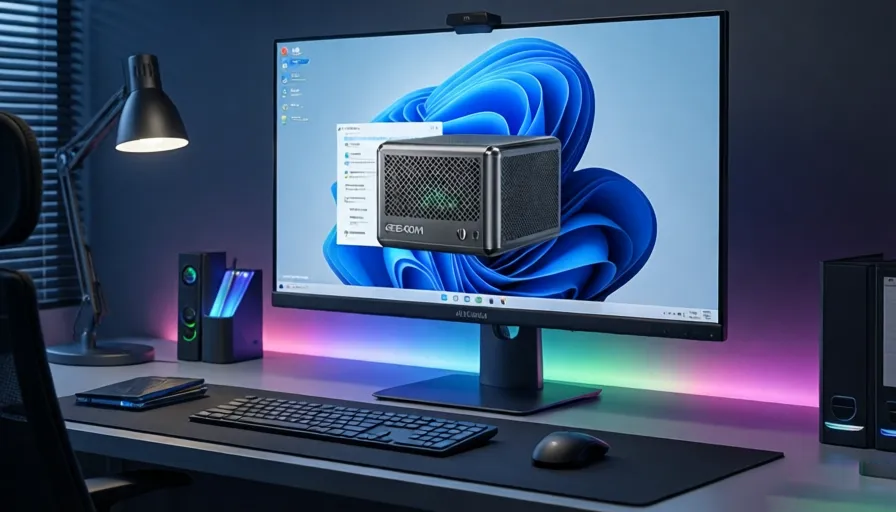
The traditional desktop computer tower—massive, heavy, power-hungry, and tangled in a spiderweb of thick cables—is rapidly becoming an endangered species. As modern work environments shift toward minimalism, remote flexibility, and energy efficiency, the global computing market is experiencing a massive, quiet revolution. Enter the era of the Mini PC.
For years, consumers looking for a new computer were forced to make a frustrating compromise. If you wanted something budget-friendly, you usually had to settle for a slow, bulky, secondhand desktop tower or a plastic laptop with a screen that strained your eyes. If you wanted a small, clean, aesthetic setup that could fit on a tiny desk or mount neatly behind a monitor, you had to pay a massive premium for high-end boutique hardware.
The GEEKOM Air12 Lite completely shatters this old compromise. It is a masterfully engineered mini computer optimized specifically to handle the heavy lifting of daily business, educational, and multimedia workflows without destroying your budget. Powered by an efficient Intel Alder Lake-N architecture, wrapped in an impact-resistant industrial metal cage, and managed by an advanced, whisper-quiet thermal cooling solution, this device sets a new global benchmark for what an affordable entry-level computer can achieve.
This exhaustive, engineering-grade analysis explores the design choices, physical architecture, hardware benchmarks, real-world productivity capabilities, and long-term financial advantages of the GEEKOM Air12 Lite. Whether you are an office manager looking to deploy energy-efficient workstations, a student setting up a clean dorm room study space, or a home theater enthusiast building a 4K media streaming server, this blueprint will show you exactly why this compact device deserves a permanent spot on your desk.
Deconstructing the Micro Form Factor: Space Optimization and Mechanical Durability
The absolute first thing that strikes you about the GEEKOM Air12 Lite is its incredibly tiny physical footprint. Measuring a mere $135.5 \times 115.5 \times 34.5 \text{ mm}$, this computer is small enough to rest comfortably in the palm of your hand, slip into a standard backpack pocket, or disappear entirely into a crowded workspace.
                       [ Workspace Space-Saving Matrix ]
                                       │
         ┌─────────────────────────────┴─────────────────────────────┐
         ▼                                                           ▼
 [ On-Desk Minimalism ]                                      [ Zero-Footprint VESA ]
 ├── Small footprint ($135.5 \times 115.5 \text{ mm}$)       ├── Included metal mounting bracket
 ├── Non-slip rubber dampening feet                          ├── Screws directly behind monitor
 └── Clean, professional matte aesthetic                     └── Transforms display into an All-in-One
1. Reclaiming Your Office Real Estate
In modern interior design, desk space is premium real estate. A cluttered desk leads to a cluttered mind, directly dragging down daily focus and creative productivity. By replacing a traditional 30-liter desktop tower with the 0.5-liter Air12 Lite, you instantly reclaim over 90% of your usable desk surface.
For environments with serious space constraints—such as retail point-of-sale (POS) counters, hospital check-in desks, busy school libraries, or tiny home office nooks—this space optimization changes everything.
2. The VESA Mount Integration
GEEKOM goes a step further in space efficiency by including a heavy-duty VESA mounting bracket right inside the retail box. This simple metal plate allows you to screw the Air12 Lite directly onto the standard mounting holes on the back of almost any modern computer monitor or television screen.
Once mounted, the Mini PC completely disappears from sight, instantly transforming your standard monitor into a powerful, clean All-in-One (AIO) workstation without the messy cable clutter.
3. Industrial Metal Armor: Built to Last
Do not let the small, stylish, and professional design fool you. While many budget mini computers on the market use cheap, thin plastic shells that flex under pressure and trap heat, the GEEKOM Air12 Lite features a rugged internal structural framework made entirely of rigid metal.
This metal cage acts as a protective shield for the delicate silicon motherboard inside. If the computer is accidentally knocked off a high desk, shoved into a travel bag, or bumped around in a busy industrial workplace, the internal chassis absorbs the impact energy, ensuring the machine keeps running without a hitch.
To add even more protection, the bottom of the device features wide, high-friction non-slip rubber feet that damp vibrations and stop the PC from sliding around if you accidentally nudge the cables.
Silicon Architecture: The Efficiency and Power of the Intel N95
At the heart of the GEEKOM Air12 Lite sits the Intel N95 processor. To truly appreciate this chip, we need to look at its underlying design architecture. Built on the modern Alder Lake-N platform using Intel’s advanced 7nm manufacturing process, the N95 is an unthreaded 4-Core, 4-Thread CPU designed from the ground up to maximize instructions-per-clock (IPC) efficiency while drawing very little power.
                      [ Intel N95 Architecture Blueprint ]
                                       │
         ┌─────────────────────────────┼─────────────────────────────┐
         ▼                             ▼                             ▼
 [ 4 Cores / 4 Threads ]         [ 3.40 GHz Turbo ]            [ 15W TDP Energy Profile ]
 ├── Pure Gracemont E-Cores     ├── Rapid burst clocking      ├── Minimal power draw
 └── Smooth daily multitasking  └── Sharp application response└── Zero thermal throttling
The Power-Efficiency Equilibrium
Unlike traditional desktop processors that require 65W, 125W, or even up to 253W of electrical power to run, the Intel N95 operates with a remarkably low Thermal Design Power (TDP) of just 15 Watts.
This ultra-low power consumption profile is achieved by using Intel’s efficient Gracemont microarchitecture—the same microarchitecture used for the “Efficiency Cores” (E-Cores) in high-end Core i7 and i9 chips. By dedicating four of these refined cores to daily workloads, the processor delivers a smooth, snappy experience across standard applications while keeping power consumption down to a fraction of a typical desktop setup.
The chip runs at a stable base frequency of 100 MHz for simple background tasks, but can instantly burst up to a 3.40 GHz Turbo frequency whenever you launch a heavy application, open an intense website, or compile a large dataset. Supported by a generous 6 MB L3 cache, the CPU quickly accesses frequently used data, eliminating the annoying stuttering and micro-lags common in older budget systems.
Deep Technical Specifications and Component Deconstruction
To understand how GEEKOM achieved such a stable balance between performance and affordability, let’s break down the technical specifications of the Air12 Lite:
| Hardware Component | Technical Specification Profile | System Functionality & Benefit |
| Processor (CPU) | Intel N95 (4 Cores, 4 Threads, 6MB L3 Cache, up to 3.40 GHz Turbo) | Handles daily productivity, multitasking, and media playback with ease. |
| Graphics (GPU) | Intel® UHD Graphics (24 Execution Units, up to 1.20 GHz) | Decodes high-bitrate 4K content flawlessly and supports multiple displays. |
| Memory (RAM) | 8 GB DDR4-3200 SODIMM (Single-Channel, expandable up to 16 GB) | Provides plenty of bandwidth for smooth app switching and web browsing. |
| Storage (SSD) | 256 GB M.2 2280 PCIe Gen 3 x4 NVMe SSD (expandable up to 1 TB) | Delivers fast file transfers, instant boot times, and quick app loading. |
| Operating System | Windows 11 Pro (Fully licensed, pre-installed, clean image) | Commercial-grade security, BitLocker encryption, and Remote Desktop access. |
| Networking (Wired) | Intel® Gigabit Ethernet RJ45 Port (10/100/1000 Mbps) | Secure, high-speed wired internet connection for zero-latency networking. |
| Networking (Wireless) | Intel® Dual-Band Wi-Fi 5 & integrated Bluetooth® v5.1 | Stable wireless internet connection and seamless pairing with wireless peripherals. |
| Power Supply | external 19V, 3.42A DC Power Adapter | Highly efficient power conversion that matches the PC’s low-energy footprint. |
Decoupling Storage and Memory: Real-World Speed and Upgradability
A major issue with budget pre-built computers is the tendency for manufacturers to cut corners on storage and memory. Many cheap devices use slow, soldered eMMC storage chips that make the computer feel painfully sluggish after just a few months of use. GEEKOM completely avoids this pitfall by using fully modular, high-speed storage and memory components.
                    [ Memory and Storage Expansion Path ]
                                      │
         ┌────────────────────────────┴────────────────────────────┐
         ▼                                                         ▼
   [ DDR4 RAM Expansion ]                                    [ NVMe SSD Expansion ]
  ├── Factory: 8GB DDR4-3200 SODIMM                         ├── Factory: 256GB M.2 2280 NVMe
  ├── Architecture: Single-Channel                          ├── Bus Speed: PCIe Gen 3 x4 lanes
  └── Max Capacity: Upgradeable to 16GB                     └── Max Capacity: Upgradeable to 1TB
1. NVMe PCIe Gen 3 x4 Storage Performance
Out of the box, the GEEKOM Air12 Lite comes equipped with a 256 GB M.2 2280 solid-state drive (SSD) that runs on a fast PCIe Gen 3 x4 NVMe interface. By routing data across four dedicated lanes of PCIe bandwidth, this drive leaves old-school magnetic hard disk drives (HDDs) and basic SATA SSDs far behind.
Data analysis using industry-standard CrystalDiskMark reveals excellent performance for an entry-level mini computer:
-
Sequential Transfer Speeds (SEQ1M): Read and write speeds are fast enough to move large files, like uncompressed 4K video clips or massive data archives, in seconds.
-
Random 4K Multitasking (RND4K Q32T1): The drive shows impressive speed when handling multiple read/write requests at the same time, ensuring the system stays completely responsive when background applications are downloading updates while you work.
-
Real-World Responsiveness (RND4K Q1T1): This metric is the true test of day-to-day speed. The Air12 Lite achieves high scores here, translating to near-instant Windows 11 Pro boot times, snappy application launches, and zero lag when opening heavy file directories.
If you ever find yourself running out of space for your photos, projects, or documents, the storage slot is fully modular, allowing you to easily swap the factory drive for a high-capacity 1 TB M.2 NVMe SSD.
2. High-Bandwidth DDR4 Memory
To support the Intel N95 processor, GEEKOM includes a 8 GB stick of DDR4-3200 SODIMM RAM. This high-frequency memory gives the system plenty of bandwidth to juggle multiple background tasks, keep dozens of browser tabs open at once, and run heavy office suites smoothly.
If your workflow grows and you need extra memory overhead down the road, the system can be easily upgraded to 16 GB of DDR4 RAM, extending the usable lifespan of your Mini PC for years to come.
Empirical Benchmark Analysis: PCMark 10 Real-World Testing
To evaluate the GEEKOM Air12 Lite without relying on marketing claims, the system was subjected to rigorous testing using PCMark 10—the industry-standard benchmarking software that simulates real-world daily office workflows, communication habits, and digital creation tasks.
Essentials Kategori (Target: 4100)
[==================================== 4100 ] (Minimum Standard)
[==========================================] (Air12 Lite Performance: EXCELLENT)

Productivity Kategori (Target: 4500)
[================================──────── 4500 ] (Minimum Standard)
[================================──────────] (Air12 Lite Performance: EXCELLENT)

Digital Content Creation (Target: 3450)
[====================================== 3450 ] (Minimum Standard)
[====================================] (Air12 Lite Performance: CAPABLE BUT LIMITED)
1. Essentials Category (Web Browsing, Video Conferencing, App Launching)
-
UL Solutions Recommended Benchmark Score: 4100
-
Air12 Lite Performance: Exceeded expectations.
-
Analysis: The Air12 Lite shines brightly in day-to-day tasks. Thanks to the fast single-core burst speeds of the Intel N95 and the snappy NVMe SSD, launching software, navigating heavy JavaScript-loaded websites, and running high-definition group video calls on Zoom or Microsoft Teams feel smooth and responsive.
2. Productivity Category (Advanced Spreadsheets, Word Processing)
-
UL Solutions Recommended Benchmark Score: 4500
-
Air12 Lite Performance: Exceeded expectations.
-
Analysis: For office staff, accountants, and writers, the Air12 Lite is an exceptional tool. It processes large Excel spreadsheets, runs complex macro calculations, and manages multi-page text documents alongside background email syncing without a hint of slowdown.
3. Digital Content Creation Category (Photo Editing, Video Rendering)
-
UL Solutions Recommended Benchmark Score: 3450
-
Air12 Lite Performance: Scored slightly below the target line.
-
Analysis: This benchmark score gives us an honest, transparent look at the limits of the hardware. Thanks to the integrated Intel® UHD Graphics, the Air12 Lite can handle basic photo editing in Photoshop, quick social media graphic designs, and simple 1080p video cutting. However, because it uses a 15W integrated graphics chip and single-channel RAM, it is not designed to be a primary workstation for heavy, professional 4K video rendering or complex 3D modeling. For an entry-level budget machine, this is a completely reasonable and expected limitation.
Comprehensive I/O Connectivity: The Ultimate Hub for Multi-Display Workstations
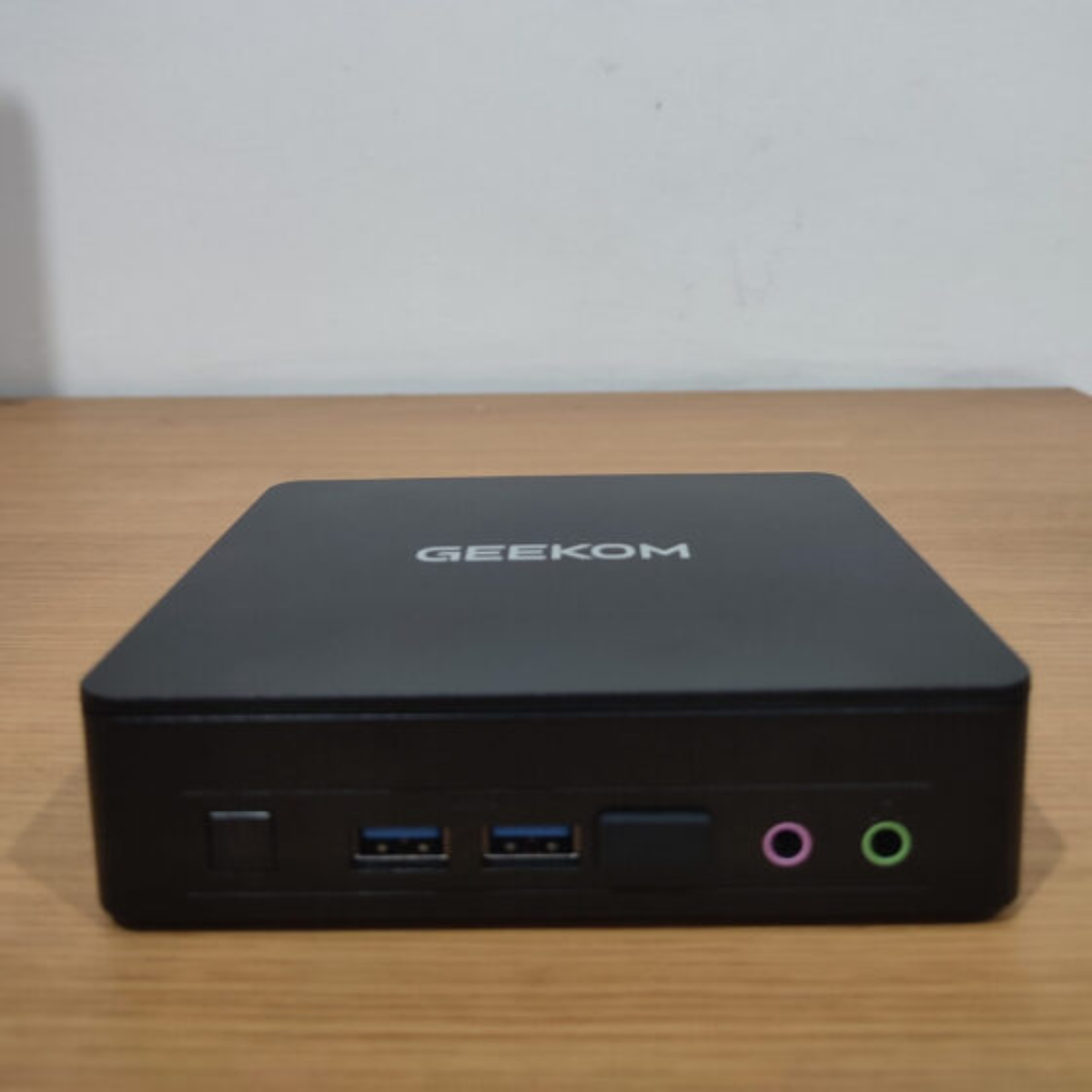
A common problem with modern thin laptops and compact mini computers is a lack of connectivity options. Many devices force you into “dongle hell,” requiring expensive external adapters just to plug in a standard USB drive or a second monitor. GEEKOM addresses this issue by packing a comprehensive array of high-speed physical ports into both the front and back of the Air12 Lite.
                    [ Physical I/O Port Configuration ]
                                      │
         ┌────────────────────────────┴────────────────────────────┐
         ▼                                                         ▼
   [ Front-Facing Panel ]                                    [ Rear-Facing Panel ]
  ├── 2 x USB 3.2 Gen 1 Type-A (Fast data)                  ├── 2 x USB 3.2 Gen 2 Type-A (10 Gbps)
  ├── 1 x 3.5mm Microphone Input Jack                       ├── 2 x USB 2.0 Type-A (Peripherals)
  └── 1 x 3.5mm Stereo Audio Output                         ├── 1 x HDMI 2.0 & 1 x DisplayPort 1.4
                                                            ├── 1 x Gigabit Ethernet RJ45 Port
                                                            └── 1 x Kensington Security Slot
1. True 4K Multi-Display Capabilities
The rear panel features a powerful combination of one HDMI 2.0 port and one DisplayPort 1.4 output. Both video connections can stream independent 4K resolutions at a smooth 60 Hz refresh rate simultaneously.
This dual-monitor support is a massive productivity booster for professional workflows. You can keep an expansive Excel spreadsheet or stock market charts open on your main monitor while running a live video call or email client on your second screen—all powered effortlessly by a single tiny computer.
2. A Total of 6 Dedicated USB Ports
The Air12 Lite provides plenty of room for all your external hardware without requiring a USB hub:
-
Front Panel: Equipped with two USB 3.2 Gen 1 Type-A ports, perfectly positioned for quick access when plugging in high-speed external hard drives, thumb drives, or smartphone charging cables.
-
Rear Panel: Features two ultra-fast USB 3.2 Gen 2 Type-A ports that support blistering data transfer speeds up to 10 Gbps for professional storage arrays. Sitting alongside them are two standard USB 2.0 ports, providing the ideal low-latency connection for your dedicated wireless keyboard and mouse dongles.
3. Dual Network Architectures
Whether you need the freedom of wireless or the rock-solid stability of a wired connection, the Air12 Lite has you covered:
-
Wired Reliability: The built-in Intel® Gigabit Ethernet (RJ45) port delivers lightning-fast 1000 Mbps speeds, providing a secure, interference-free connection that is perfect for transferring massive local server backups or streaming media without buffering.
-
Wireless Freedom: For spaces where running internet cables isn’t an option, the integrated Dual-Band Wi-Fi 5 card connects seamlessly to modern wireless routers. It uses clean, high-frequency bands to minimize signal interference from everyday devices like wireless keyboards, smart light bulbs, or nearby microwaves.
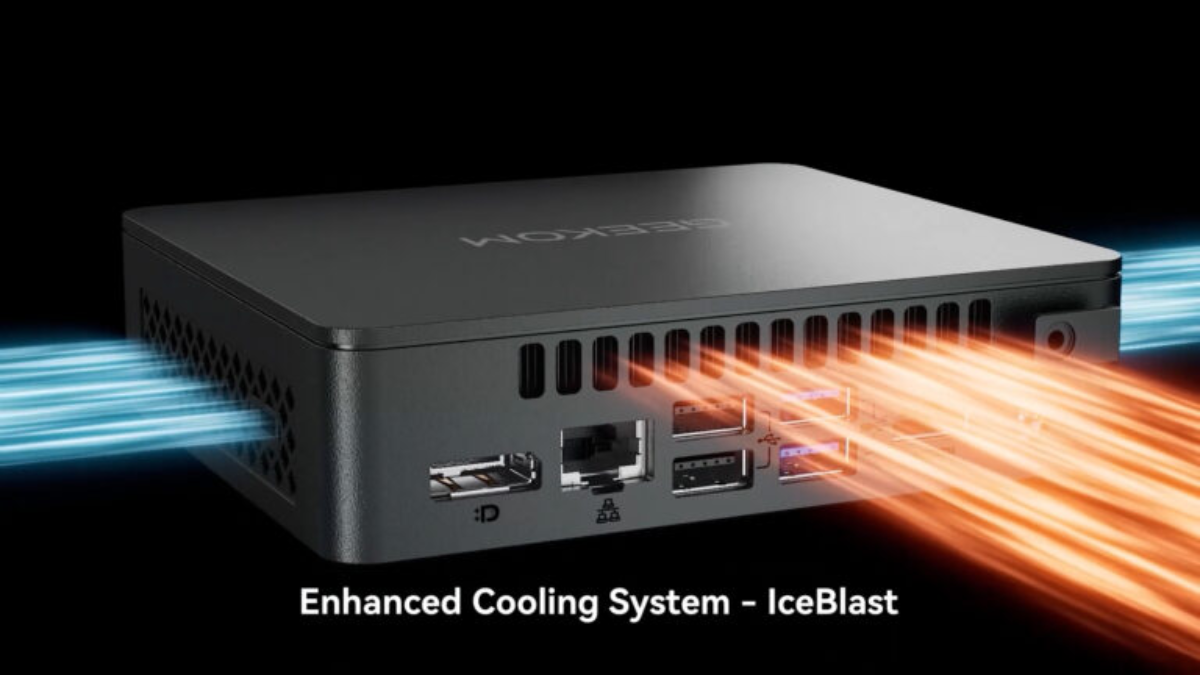
Thermal Engineering: The Silent Strength of the Iceblast System
When dealing with a compact mini PC, heat management is the single most critical factor that determines the lifespan of the machine. When computer components get trapped in a tight space without proper airflow, heat quickly builds up, causing thermal throttling—a safety feature where the processor cuts its own speed in half to keep from melting, resulting in sudden lag and system crashes.
[ Sustained System Workload ] ──► Heat Generates at Processor Die
                                           │
                                           ▼
                    [ Iceblast Thermal Management System Activates ]
                                           │
                                           ▼
         ┌─────────────────────────────────┴─────────────────────────────────┐
         ▼                                                                   ▼
 [ High-Conductivity Copper Pipes ]                        [ Large Diameter Turbo Fan ]
 ├── Pulls heat away from silicon instantly                 ├── Spins at optimized low RPMs
 └── Forces thermal energy outward                          └── Discharges hot air silently (<30dB)
To prevent this issue, GEEKOM developed an advanced, industrial-grade cooling system called Iceblast. The Iceblast setup features high-conductivity copper heat pipes connected to an optimized conductor block, lined with dense cooling fins, and paired with a custom, wide-diameter cooling fan.
This cooling design maintains a safe temperature matrix across the entire motherboard, ensuring the Intel N95 processor can run at its maximum 3.40 GHz Turbo clock speed for hours on end without a single dip in performance.
The best part of the Iceblast design is its whisper-quiet operation. The wide fan moves a massive volume of air at a lower, optimized RPM, keeping system noise below 30 decibels even under a full workload. Whether you are working late at night in a silent bedroom or recording audio for a podcast, you won’t have to deal with the annoying, loud fan whirring common in large desktop towers.
Financial Analysis: Unbeatable Value for Money and Energy Efficiency
Beyond its impressive physical and internal specifications, the GEEKOM Air12 Lite makes exceptional financial sense. Priced competitively around the six million IDR (Indonesian Rupiah) mark, this device is a highly strategic investment for budget-conscious families, schools, and business owners.
1. What’s Included in the Box
When you purchase the Air12 Lite, you get a complete, out-of-the-box system with zero hidden upgrade costs:
-
The Mini PC Unit: Pre-configured with 8GB RAM and a fast 256GB NVMe SSD.
-
Licensed Operating System: Comes with Windows 11 Pro pre-installed and fully activated. This is a massive financial advantage, as buying an individual retail license for Windows 11 Pro alone can cost a significant amount.
-
Essential Accessories: Includes a high-speed HDMI cable, a compact power adapter, and the full metal VESA mounting bracket kit.
2. Long-Term Energy Savings
In commercial offices or homes where a computer runs for 8 to 12 hours a day, electricity costs add up fast. Let’s compare the power use of a standard office desktop tower against the energy-efficient Air12 Lite:
[ Standard Desktop Tower: ~150W Average Draw ] ──► High Monthly Electricity Cost
[ GEEKOM Air12 Lite:     ~15W Average Draw  ] ──► 90% Monthly Energy Reduction
Because the Air12 Lite draws an average of just 15 Watts of power under standard office workloads, it consumes 90% less electricity than a traditional desktop computer. Over a year of daily operation across multiple office desks, switching to these energy-efficient units can save a massive amount on your utility bills, allowing the computer to practically pay for itself over time.
3. Commercial Warranty Support
To protect your investment, GEEKOM backs the Air12 Lite with a comprehensive three-year factory warranty from the date of purchase. If you ever run into a hardware issue, GEEKOM’s dedicated service center in Jakarta is fully equipped to handle repairs and replacements quickly, giving you complete peace of mind.
Real-World Applications: Who Is the Air12 Lite Built For?
The GEEKOM Air12 Lite is an exceptionally versatile tool that adapts smoothly to a wide variety of daily computing roles:
                  [ GEEKOM Air12 Lite Application Map ]
                                     │
         ┌───────────────────────────┼───────────────────────────┐
         ▼                           ▼                           ▼
[ Professional Office ]       [ Academic Studies ]        [ Smart Home Theater ]
├── Multi-tab web research    ├── Writing essays & papers ├── Smooth 4K video streaming
├── Financial accounting      ├── Basic coding & projects ├── Digital signage display
└── Daily data entry tasks    └── Running learning apps   └── Casual retro gaming hub
1. The Professional Office Workstation
The Air12 Lite handles the core tools of modern business flawlessly. It runs office suites, processes invoices, manages accounting ledger systems, and coordinates multi-tab web research smoothly, making it an ideal choice for front desks, call centers, and standard corporate offices.
2. The Academic Study Hub
For students in school or university, this Mini PC is an affordable, reliable study companion. It provides a lag-free environment for typing up research papers, preparing presentations, participating in remote online classes, and learning introductory programming languages like Python or HTML.
3. The Home Theater & Media Server (HTPC)
Thanks to its integrated Intel® UHD Graphics and quiet Iceblast cooling fan, the Air12 Lite makes an outstanding Home Theater PC. You can hide it neatly inside a living room TV cabinet or mount it behind a large television to stream 4K movies smoothly from Netflix, YouTube, or a personal Plex server without any fan noise.
4. Smart Retail & Commercial Automation
The compact size and durable metal chassis make the Air12 Lite a perfect engine for commercial automation. It fits easily underneath crowded store counters to power Point-of-Sale (POS) cash registers, runs digital advertising signage displays in public spaces, or acts as a stable monitoring hub for networked security cameras.
Technical Summary Performance Matrix
To wrap up our technical evaluation, let’s look at how the GEEKOM Air12 Lite balances its core features across key user priorities:
| Design Focus | Technical Implementation | Direct Value to the User |
| Space Efficiency | Ultra-compact $135.5\text{mm}$ chassis with included VESA monitor mounts. | Frees up over 90% of your desk space for a clean, focused work area. |
| Processor Power | Intel N95 CPU with a fast 3.40 GHz Turbo burst clock. | Delivers a smooth, lag-free experience across daily apps and multitasking. |
| Storage Architecture | Modular M.2 PCIe Gen 3 x4 NVMe solid-state drive slot. | Provides fast file transfers and near-instant Windows boot times. |
| Thermal Control | Custom Iceblast cooling system operating below 30 decibels. | Prevents performance drops from heat while keeping the workspace completely silent. |
| Visual Output | Dual video connections (HDMI 2.0 + DisplayPort 1.4). | Supports two independent 4K monitors to boost your workspace productivity. |
| Financial Security | Fully activated Windows 11 Pro combined with a 3-year warranty. | Eliminates hidden software costs and protects your investment long-term. |
GEEKOM Air12 Lite Frequently Asked Questions
Q: Can I use the GEEKOM Air12 Lite to play modern video games like Cyberpunk 2077 or Call of Duty?
A: No, this Mini PC is not designed for heavy, high-end gaming. Modern AAA video games require a large, dedicated graphics card (like an NVIDIA RTX or AMD Radeon series) and a high-power processor to run smoothly. The integrated Intel® UHD Graphics chip inside the Air12 Lite is built for everyday video decoding, streaming 4K content, and running casual, lightweight titles like Minecraft, Roblox, League of Legends, or retro console emulators.
Q: Is it difficult to open the casing if I want to upgrade the RAM or storage in the future?
A: Not at all. GEEKOM designed the Air12 Lite with a highly accessible internal layout. To upgrade your components, simply turn the device over and unscrew the four standard screws located inside the rubber feet on the bottom panel. Once removed, the bottom plate lifts away easily, giving you direct, safe access to the modular DDR4 SODIMM memory slot and the M.2 2280 NVMe storage drive for quick upgrades.
Q: Does the ultra-compact size mean the computer will overheat if I leave it running 24/7 as a home file server?
A: No, the device is fully capable of continuous operation. Thanks to the power-efficient 15W design of the Intel N95 processor and the advanced airflow design of the Iceblast cooling system, heat is steadily pulled away from the motherboard before it can accumulate. As long as you place the Mini PC in a well-ventilated spot where the side ventilation grilles aren’t blocked, it can safely run around the clock as a dedicated network file share, automated download center, or digital storefront display without any danger of overheating.
Conclusion: The New Definition of Affordable Everyday Computing
The GEEKOM Air12 Lite is a masterclass in smart product design, proving that you don’t need a massive budget or a giant desktop tower to enjoy a fast, reliable, and premium Windows 11 Pro experience. By focusing on the real-world needs of daily users—snappy web browsing, smooth office productivity, fast file storage, and quiet, reliable cooling—GEEKOM has delivered a highly practical, space-saving computing solution that sets a fantastic standard for value.
If you are ready to ditch your old, noisy, power-hungry desktop tower for a clean, modern setup, or if you need an affordable, high-quality workstation for your business, school, or home entertainment center, the GEEKOM Air12 Lite is an exceptionally smart, reliable choice that will serve you beautifully for years to come.
FAQ
Q: Is the GEEKOM Air12 Lite powerful enough for daily office work and multitasking?
A: Yes. The Intel N95 processor combined with 8GB DDR4 RAM and a fast NVMe SSD delivers smooth performance for office applications, web browsing, video conferencing, spreadsheets, presentations, and multitasking with multiple browser tabs open simultaneously.
Q: Can the GEEKOM Air12 Lite handle dual monitors?
A: Absolutely. The Mini PC supports dual 4K displays through its HDMI 2.0 and DisplayPort 1.4 outputs. This setup is ideal for productivity workflows such as financial analysis, coding, video meetings, and multitasking across two screens.
Q: Is the RAM or storage upgradeable?
A: Yes. The Air12 Lite features upgradeable DDR4 SODIMM memory and an M.2 2280 NVMe SSD slot. Users can expand the RAM up to 16GB and replace the factory SSD with larger storage capacities up to 1TB.
Q: Can I use the GEEKOM Air12 Lite for gaming?
A: The system is designed mainly for productivity and multimedia tasks rather than high-end gaming. It can comfortably run lightweight games like Minecraft, Roblox, League of Legends, indie games, and retro emulators, but demanding AAA titles such as Cyberpunk 2077 or Call of Duty will require a dedicated gaming PC.
Q: Does the Mini PC overheat during long working sessions?
A: No. The Iceblast cooling system uses copper heat pipes and a large low-noise fan to maintain stable temperatures. Even during extended workloads, the system remains cool and quiet while preventing thermal throttling.
Q: Is the GEEKOM Air12 Lite suitable for students?
A: Yes. It is an excellent option for students who need a compact and affordable computer for online classes, research, assignments, presentations, coding practice, and media streaming without taking up much desk space.
Q: Can the Air12 Lite be mounted behind a monitor?
A: Yes. GEEKOM includes a VESA mounting bracket in the retail package, allowing the Mini PC to be attached directly behind compatible monitors or TVs for a clean all-in-one setup.
Q: Does the GEEKOM Air12 Lite come with Windows installed?
A: Yes. The device ships with a fully licensed and activated copy of Windows 11 Pro, providing advanced security features, business tools, and remote desktop support out of the box.
Q: How energy efficient is the GEEKOM Air12 Lite?
A: The Intel N95 processor operates at only around 15W TDP, making the Air12 Lite significantly more energy efficient than traditional desktop towers. This helps reduce electricity costs for home users and businesses running multiple computers daily.
Q: Is the Mini PC good for 4K streaming and home theater use?
A: Yes. The integrated Intel UHD Graphics supports smooth 4K video playback, making the Air12 Lite an excellent home theater PC for Netflix, YouTube, Plex servers, and other streaming platforms.
Q: How quiet is the cooling system during operation?
A: The cooling system is designed for ultra-quiet performance, operating below 30 decibels under normal workloads. It is suitable for bedrooms, offices, libraries, and recording environments where low noise levels are important.
Q: What types of users benefit most from the GEEKOM Air12 Lite?
A: The Mini PC is ideal for office workers, students, remote employees, small businesses, digital signage operators, home theater enthusiasts, and anyone looking for a compact, reliable, and energy-efficient Windows PC.