
The software development landscape has officially shifted from traditional syntax building to intent-focused architecture. At Google I/O 2026, Google unveiled a massive structural upgrade to its developer tools across the Android, Google Play, and Google Chrome ecosystems. Rather than simply adding basic code completion autofills, the company introduced a deep, dual-sided AI framework that automates both front-end discovery for users and back-end application management for engineers.
This shift marks Google’s formal entry into “Vibe Coding”—a development model where programmers guide complex applications using high-level prompts, structural logic, and AI collaboration rather than writing boilerplate code manually. However, this ecosystem upgrade isn’t rolling out uniformly across the board; Google is rolling it out in targeted phases, focusing heavily on specific app architectures, hardware integrations, and web standards.
Here is a comprehensive breakdown of Google’s new developer ecosystem, analyzed from both the consumer-facing storefront and the underlying technical architecture.
The AI-Driven Play Store Dual-Perspective Ecosystem
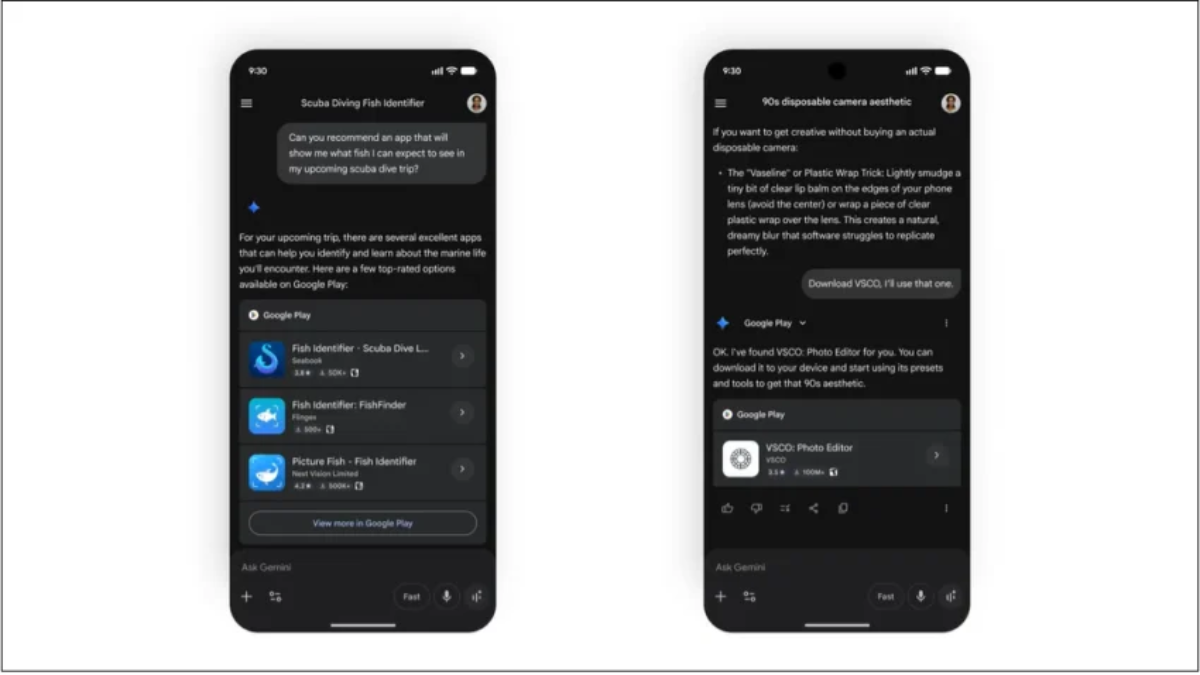
Google is turning the Play Store into an interactive environment where Gemini handles discovery, customer relations, and subscriber retention. This change directly addresses both consumer discovery issues and administrative challenges for developers.
               THE GOOGLE PLAY AI DUAL-PERSPECTIVE STREAM
                                   │
     ┌─────────────────────────────┴─────────────────────────────┐
     ▼                                                           ▼
[ CONSUMER DISCOVERY LAYER ]                    [ DEVELOPER MANAGEMENT LAYER ]
 ├── Gemini Direct Referrals                     ├── Keyword-Insight Store Listings
 └── "Ask Play" Interactive Q&A                  └── Automated Retention & Risk Grace
1. The Consumer Discovery Experience
For users, finding the right software is moving away from basic keyword searches and shifting toward conversational intent.
-
Gemini Store Routing: When a user asks Gemini for an application recommendation (e.g., “Find me a tool that tracks interval running and integrates with my local calendar”), the AI doesn’t just display a text list. It processes the specific parameters and paths the user directly to the app’s official Play Store installation page.
-
“Ask Play” Q&A Interface: Once on an application listing page, users can open a native “Ask Play” chat panel. Instead of scrolling through thousands of user reviews or guessing if an app supports a specific feature, shoppers can ask direct questions (e.g., “Does this video editor support 10-bit color exports without a pro upgrade?”). The system parses the application’s underlying code documentation and terms of service to deliver an immediate, accurate answer.
2. The Developer Management Dashboard
On the backend, Google is deploying AI to act as an automated product manager and financial analyst. This helps offset the platform’s 10% to 20% platform revenue cut by taking over tasks that typically require dedicated staff.
-
Automated Listing Engines: The system tracks real-time search trends and automatically drafts optimized store listings, targeted keywords, and localized descriptions to help apps stand out in crowded categories.
-
Intelligent Subscription Protection: Instead of cutting off users immediately when a credit card payment fails, the new billing system runs a low-risk check on the subscriber’s historical payment patterns. If the user is flagged as low-risk, the AI grants a smart grace period, keeping premium features unlocked while quietly resolving the billing glitch in the background.
-
Dynamic Retention Delivery: The moment a user clicks “cancel subscription,” the system automatically analyzes their app usage history and generates a personalized retention offer—such as a targeted discount or a temporary feature upgrade—to prevent churn.
The “Vibe Coding” Reality Targeted Frameworks and Sandbox Limits
The most discussed element of Google I/O 2026 is the expansion of prompt-driven coding via Google AI Studio. While the prospect of building entire production-grade applications using simple text commands is highly appealing, Google’s current deployment model includes strict guardrails.
                 VIBE CODING ACCELERATION ZONES
                                │
     ┌──────────────────────────┴──────────────────────────┐
     ▼                                                     ▼
[ APPROVED EXPERIMENTAL CATEGORIES ]     [ LOCKED COMPLEX ENTERPRISE ARCHITECTURES ]
 ├── Personal Utilities & Social Apps     ├── Heavy Financial Systems & Banking
 ├── Hardware-Tied (Camera/Gyroscope)     ├── Large-Scale Enterprise Databases
 └── Native Gemini-Powered Ecosystems     └── Multi-Platform Cloud Frameworks
To prevent performance drops and protect system stability, Google is strictly limiting this automated code generation to a few sandbox categories:
-
Personal Utilities and Simple Social Media Platforms: Ideal for standard data layouts, messaging networks, and task management systems.
-
Hardware-Integrated Applications: Systems designed to connect directly with on-device hardware components, specifically utilizing cameras, accelerometers, and gyroscopes.
-
Native Gemini AI Experiences: Software designed from the ground up to plug directly into Google’s foundational models.
For complex database systems, high-security banking tools, or massive enterprise platforms, traditional programming remains the standard. However, within these approved sandboxes, the development timeline is dropping from weeks to hours.
CLI Integrations and Next-Gen Open Web Engineering
For developers working outside of Google’s native interfaces, the company introduced a flexible Command Line Interface (CLI) framework designed to connect with third-party programming assistants.
              CLI ASSISTANT INTERMEDIARY ARCHITECTURE
[ Raw Prompt Intent ] ──► [ Claude Code / Codex ] ──► [ Google Developer CLI ] ──► [ Android System Output ]
This structural bridge allows tools like Anthropic’s Claude Code and OpenAI’s Codex to run commands directly inside the Android development workflow. This setup lets teams maintain their preferred developer toolchains while using advanced AI agents to handle debugging, refactoring, and performance tuning.
Furthermore, Google is introducing Play Shorts—short-form promotional videos integrated directly into the Play Store timeline to give listings a modern, engaging feel—alongside Play Games Sidekick, an AI-driven coaching overlay that provides real-time guidance and gameplay assistance to players.
Technical Feature Distribution Across the Developer Stack
The following matrix categorizes all major developer tools introduced across the mobile and web deployment layers.
Redefining Web Connectivity WebMCP and Built-In Chrome Intelligence
The updates to Google Chrome focus heavily on redefining how AI software interacts with standard web infrastructure. The standout announcement is the developer trial of WebMCP, a web-focused implementation of the Model Context Protocol (MCP).
                  WEBMCP API CONNECTION PIPELINE
┌──────────────────────────────┐              ┌──────────────────────────────┐
│  Traditional Web Connection  │              │    WebMCP Protocol Standard  │
├──────────────────────────────┤              ├──────────────────────────────┤
│ • Brute-force page scraping  │      VS      │ • Direct structural API node │
│ • Fragile DOM dependent text │              │ • Secure context translation │
│ • High processing overhead   │              │ • Frictionless agent traffic │
└──────────────────────────────┘              └──────────────────────────────┘
Historically, when an AI agent wanted to help a user buy a product or book a flight, it had to rely on web scraping—manually reading the visual layout of a page, which often broke if the site updated its design.
WebMCP solves this by providing a secure, standardized bridge that lets AI agents communicate directly with a website’s internal APIs. Rather than trying to navigate a complex visual interface, the AI can read and process clean data structures instantly. Google has already partnered with several major online platforms to test this standard:
-
Travel and Housing Engines: Booking.com, Expedia, and Redfin.
-
E-Commerce Marketplaces: Shopify, Etsy, Target, and Instacart.
-
Financial and Tax Platforms: Credit Karma and TurboTax.
Additionally, Chrome is expanding its suite of built-in browser AI tools. By running smaller models directly on the user’s local device instead of relying entirely on external servers, the browser can handle text polishing, code optimization, and real-time debugging with near-zero latency, all while keeping user data private.
Comprehensive Implementation Roadmap for Developers
To help your development team smoothly adopt these new tools, follow this structured, step-by-step implementation guide.
Step 1: Prepare Your Workspace for AI-Driven Workflows
Before migrating any production code into Google AI Studio, ensure your environment meets the necessary structural and security requirements.
Step 2: Set Up and Monitor Your Autonomous Management Tools
Once your store integrations are live, transition your team from manual listing optimization to a supervisory monitoring workflow.
               AUTOMATED RELEASE PRODUCTION CYCLE
                                │
     ┌──────────────────────────┴──────────────────────────┐
     ▼                                                     ▼
[ STANDARD ENGINE ANOMALY ]               [ CLEAN INTEGRATION PASS ]
 ├── Flag payment grace risk variants     ├── Keyword-insight listings deploy
 ├── Resolve API schema mismatches        ├── Automated grace metrics accumulate
 └── Action: Manual Override Fix          └── Action: Scale Global Rollout
Monitor your automated store dashboards closely during the first few weeks. Watch how the AI handles grace periods for failed payments and verify that your generated store listings accurately match current user search trends. This oversight keeps your brand messaging accurate while letting the AI handle repetitive operational tasks.
Conclusion: Adapting to the New Developer Paradigm
The tools unveiled at Google I/O 2026 show that AI is no longer just a coding assistant—it is becoming a core part of the underlying operating system and web infrastructure. For developers and digital businesses, the rise of “vibe coding” options, automated store management, and structural web standards like WebMCP offers an excellent opportunity to reduce operational overhead and scale faster.
By using automated store listings to cut down on marketing work, leveraging local browser AI for real-time debugging, and building secure API bridges for external AI agents, teams can spend less time on repetitive maintenance and more time building great features.
Review your development pipelines, update your authentication frameworks to support modern standards like Immediate UI, and start integrating these smart tools into your workflow today.
Developer Ecosystem — Frequently Asked Questions (FAQ)
1. Does the WebMCP standard pose any security risks to our site’s internal user databases?
No. WebMCP acts as a secure, structured gateway that only exposes the specific public API endpoints you choose to make accessible. It does not grant external AI agents deep access to your underlying server infrastructure or user databases. Think of it as a controlled communication channel; the AI agent can only request and send data that you have explicitly permitted through your site’s standard API permissions.
2. What happens if our app doesn’t fall into the three categories approved for AI Studio Vibe Coding?
You can still build and manage your app using traditional development methods, but you won’t be able to use the automated prompt-based code generation features in Google AI Studio just yet. Google is keeping this experimental coding system limited to simple utilities, social apps, and hardware-tied tools during its initial testing phase to ensure system stability. As the underlying models mature, Google plan to expand these coding features to more complex software architectures.
3. How does Immediate UI Mode help improve passkey adoption on our website?
Immediate UI Mode helps users transition away from traditional passwords by combining both login methods into a single, seamless prompt. Instead of forcing users to explicitly choose between typing a password or activating a passkey, the browser displays a unified sign-in box. If the user’s device has a passkey registered, they can authenticate instantly using biometrics (like a fingerprint or face scan), removing the friction that typically slows down passkey adoption.
4. Are there extra platform fees for using the automated Play Store management tools?
No. These AI-driven management and marketing tools are included as part of your standard Google Play Developer Console access. Google introduced these automated services to help ease the administrative burden on developers, making the platform’s standard 10% to 20% revenue cut more valuable by taking over tasks like keyword optimization, customer retention marketing, and payment risk analysis.