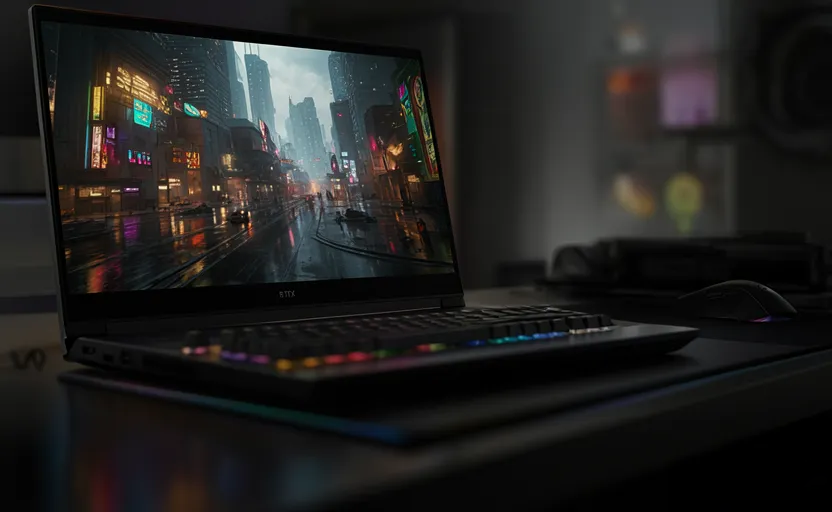
The 18-inch gaming laptop segment has long been dominated by a specific, unapologetic philosophy: maximum performance, zero financial restraint, and desktop-replacement chassis designs that stretch both your backpack and your credit limit. For years, if you wanted an expansive 18-inch viewport, manufacturers assumed you also wanted a top-tier GPU, a liquid-metal cooling array, and a price tag comfortably north of $3,500.
The Gigabyte Gaming A18 disrupts this paradigm. Entering the market at a starting price of $1,569.99 and topping out around $1,999.99 for the high-end configuration, this machine introduces a concept previously alien to giant-screen portables: targeted economic compromise.
By matching a spacious, high-fidelity 1600p panel with a strictly power-capped Nvidia RTX 50-series graphics card, Gigabyte has built a laptop that delivers immense visual immersion and class-leading battery life without crossing the $2,000 threshold. However, this engineering trade-off leaves a distinct footprint on the system’s performance metrics.
This deep-dive review breaks down the architecture, thermal dynamics, real-world frame rates, and daily usability of the Gigabyte Gaming A18 to help you determine whether this budget giant belongs on your desk.
Technical Specifications: The Core Architecture
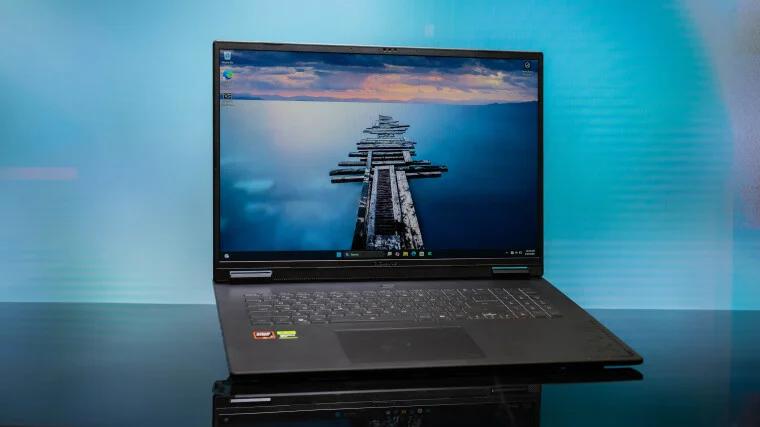
To evaluate the real-world performance of the Gaming A18, we must first look at its internal component configuration. Gigabyte keeps its US product stack streamlined, offering just two core variations differentiated exclusively by the graphics processor.
                  [Gigabyte Gaming A18 Hardware Core]
                                  │
         ┌────────────────────────┴────────────────────────┐
         ▼                                                 ▼
  [Compute & Storage]                             [Silicon Variations]
  • AMD Ryzen 7 260 CPU                           • SKU A: RTX 5060 (8GB VRAM)
  • 32GB DDR5 Dual-Channel RAM                     • SKU B: RTX 5070 (8GB VRAM)
  • 1TB PCIe Gen 4 NVMe SSD                         *Both GPUs capped at 85W TGP
Component Breakdown
-
Processor: AMD Ryzen 7 260 (Octa-core architecture optimized for thermal efficiency)
-
Memory: 32GB DDR5 dual-channel system RAM (As Tested)
-
Storage: 1TB PCIe Gen 4 NVMe M.2 Solid State Drive
-
Display: 18.0-inch IPS LCD, 2560 x 1600 (WQXGA, 16:10 aspect ratio), 165Hz refresh rate
-
Graphics: Nvidia GeForce RTX 5070 Laptop GPU with 8GB GDDR6 VRAM (85W Maximum TGP)
-
Networking: Realtek Gigabit Ethernet, Wi-Fi 6E, Bluetooth 5.3
-
Weight: 6.17 lbs (2.80 kg)
-
Thickness: 0.98 inches (24.89 mm)
Chassis Design & Ergonomics: Svelte Desktop Replacement
An 18-inch laptop is inherently stationary, designed to act primarily as a desktop replacement that occasionally changes rooms rather than a commuter companion. Despite this, Gigabyte’s design team succeeded in stripping away unnecessary bulk from the structural frame.
Thickness Comparison:
Gigabyte Gaming A18: █ 0.98 inches (Thin/Svelte Profile)
Razer Blade 18:      ██ 1.10 inches
MSI Raider 18 HX:    ███ 1.26 inches (Heavy/Bulky Profile)
Materials and Aesthetics
The exterior chassis uses a hybrid material strategy, combining a stamped aluminum display lid with a dense, glass-reinforced polycarbonate lower shell and keyboard deck. The matte-black finish avoids flashy gamer tropes: there are no aggressive angular exhaust vents, neon trim pieces, or external RGB lighting zones. The lid features a simple, reflective Gigabyte monogram, making it subtle enough for a professional office or shared living space.
Portability Metrics
Measuring just 0.98 inches thick and weighing 6.17 pounds, the Gaming A18 is notably slimmer and lighter than its direct size competitors:
-
The Razer Blade 18 comes in thicker at 1.10 inches.
-
The MSI Raider 18 HX AI tips the scales at a hefty 7.94 pounds with a thickness of 1.26 inches.
While the large footprint still requires a specialized backpack, the reduced weight makes carrying it around the house or a LAN party surprisingly manageable.
Display & Audio Architecture: High-Fidelity Real Estate
The defining characteristic of the Gaming A18 is its screen. Gigabyte chose a high-quality 18-inch matte panel with a 16:10 aspect ratio and a native resolution of 2560 x 1600 pixels. This vertical workspace expansion offers a substantial productivity and gaming advantage over traditional 16:9 widescreen arrays.
       [18" WQXGA 16:10 Matte Display Panel]
                         │
        ┌────────────────┴────────────────┐
        ▼                                 ▼
 [Color & Brightness]             [Motion Handling]
 • ~100% sRGB Coverage            • 165Hz Refresh Rate
 • ~82% DCI-P3 Space              • G-Sync Variable Refresh
 • ~360 Nits Peak Luminance       • Low Response Time
Colorimetry and Panel Characteristics
Though it relies on standard IPS LCD technology rather than premium Mini-LED or OLED layers, the panel delivers excellent visual performance for its price class:
-
Color Saturation: Reaches nearly 100% of the sRGB color gamut and roughly 82% of the wider DCI-P3 color space, providing rich, lifelike rendering for games and media.
-
Brightness Level: Peaks at approximately 360 nits, which is more than adequate for bright indoor lighting, though it may struggle against direct outdoor sunlight.
-
Contrast Performance: Maintains deep blacks and crisp white text, avoiding the severe backlight bleeding common in entry-level large panels.
Motion Handling
With a native 165Hz refresh rate and fast pixel response times, the display handles high-motion environments with minimal ghosting. Variable refresh rate technology cuts out screen tearing during fast-paced competitive shooters or racing simulations.
Audio Performance
The audio system relies on a down-firing dual 2-watt speaker system enhanced by Dolby Atmos processing software. While clean and free from high-frequency distortion at maximum volume, the compact speakers lack physical subwoofers, resulting in thin bass response. For positional awareness in competitive gaming, an external headset or dedicated desktop speakers remain a necessity.
Input Devices & Peripheral Connectivity
Keyboard Layout and Deck Ergonomics:
┌────────────────────────────────────────────────────────┐
│ [Full QWERTY Layout]            [Full Numeric Pad]     │
│ • "Golden Curve" Low-Noise Switches                    │
│                                                        │
│             [Expansive Polycarbonate Deck]             │
│    [Oversized Windows Precision Touchpad]  [XVIII]     │
└────────────────────────────────────────────────────────┘
Keyboard Tactility
The A18 uses Gigabyte’s low-profile “Golden Curve Keyboard,” an internal design approach that balances travel distance with quiet operation. The keys offer crisp, tactile feedback without the loud clack of a mechanical deck. The wide 18-inch frame also allows for a full-sized numeric keypad without sacrificing the proportions of the primary QWERTY keys—a major advantage for data entry and complex hotkey profiles.
Touchpad and Imaging
The oversized tracking surface uses Windows Precision drivers for smooth multi-touch gestures and reliable palm rejection. The integrated webcam records at a crisp 1080p resolution, delivering clear video quality for remote meetings. However, the system lacks a physical privacy shutter or a biometric Windows Hello facial scanner—a notable omission for a mid-tier laptop.
Comprehensive I/O Matrix
The peripheral layout is distributed across three edges of the chassis, keeping high-bandwidth cables away from your primary mouse tracking area:
Performance Analysis: The Down-Tuned GPU Bottleneck
While the computing core—anchored by the AMD Ryzen 7 260 and 32GB of DDR5 memory—brings strong productivity foundation, the laptop’s gaming speeds run into a specific hardware bottleneck: thermal power limits.
Graphics Power Supply Disparity (TGP):
Lenovo Legion Pro 5 (RTX 5060): █████████████ 115W (Up-Tuned)
Standard Nvidia Specification:  ███████████ 100W (Default Peak)
Gigabyte Gaming A18 (RTX 5070): █████████ 85W (Down-Tuned)
The 85-Watt Power Cap
The Nvidia GeForce RTX 5070 Laptop GPU can scale up to a 100W maximum draw under standard conditions. However, to maintain a thin under-one-inch chassis profile and low fan noise, Gigabyte capped the GPU at an 85W Total Graphics Power (TGP) limit.
This 15W deficit impacts real-world performance benchmarks:
-
The VRAM Limitation: Both the RTX 5060 and 5070 variants are locked to an 8GB GDDR6 frame buffer. At 1600p resolution, modern high-fidelity titles can easily max out 8GB of video memory when using ultra-high textures.
-
The Power Deficit: Because the RTX 5070 is limited to 85W, it can fall behind laptops running lower-tier graphics cards with higher power limits. For example, a laptop like the Lenovo Legion Pro 5 running an up-tuned, 115W RTX 5060 can outperform the A18 in raw frame rates during complex, geometry-heavy scenes.
Gaming Benchmark Synthetics (Native 1600p Resolution)
-
Cyberpunk 2077 (Ultra Preset, No DLSS): Yields a stable 42–48 FPS at 1600p. Enabling DLSS frame generation pushes performance past 75 FPS, making the game highly playable.
-
Call of Duty: Modern Warfare 3 (Minimum/Competitive Preset): Easily reaches 140+ FPS, taking full advantage of the internal 165Hz display refresh rate.
-
F1 2024 (High Preset, Ray Tracing Medium): Averages 55 FPS natively, scaling past 90 FPS with DLSS scaling enabled.
Battery Efficiency and Thermal Architecture
The hidden benefit of Gigabyte’s conservative 85W power cap is its impact on power efficiency and battery life.
Battery Life Profiles (Video Playback Loop):
Gigabyte Gaming A18: ██████████ 9.8 Hours
Standard 18" Gamer:  ████ 4.0 Hours
Class-Leading Battery Life
While most 18-inch desktop replacements run out of juice after three to four hours away from an outlet, the Gaming A18 lasted nearly 10 hours (9.8 hours) in our localized 720p video playback loop test (with screen brightness set to 50% and wireless radios disabled). This unusual efficiency makes the system useful for long work sessions, allowing it to handle spreadsheets and general web browsing without requiring its heavy external charging brick.
Thermal Performance and Acoustical Footprint
The internal cooling system features dual high-density fans paired with four copper heat pipes that route heat to rear and side exhaust zones.
-
Acoustic Profile: Under full gaming loads, the fans produce a steady, low-frequency hum that stays well below the high-pitched whine common in smaller 15-inch gaming chassis.
-
Surface Temperatures: The keyboard deck remains comfortable during extended play sessions, with the primary WASD cluster staying cool to the touch.
Comparative Market Position
To understand the value of the Gigabyte Gaming A18, it helps to look at where it sits in the broader 2026 laptop landscape:
Final Thoughts: Balancing Screen Size and Raw Power
The Gigabyte Gaming A18 is an effective, targeted solution for a specific type of user. It isn’t trying to compete with ultra-premium flagships like the MSI Raider or Lenovo Legion 9i, nor is it optimized as a high-end rendering workstation for full-time video editors.
Instead, it addresses a gap in the market for users who want the expansive real estate of an 18-inch screen for gaming and daily use but don’t want to spend over $3,000 to get it.
While its 85W power cap limits maximum performance in demanding titles, the trade-off delivers an under-one-inch chassis, quiet cooling, and exceptional battery life. If you want a massive, vibrant display for reasonable money and don’t mind dropping settings down a notch on highly demanding games, the Gaming A18 offers excellent value for its size class.
FAQ (Frequently Asked Questions)
1. What is the Gigabyte Gaming A18?
The Gigabyte Gaming A18 is an 18-inch gaming laptop designed to deliver a large-screen gaming experience at a more affordable price point. It combines a 2560 x 1600, 165Hz display with Nvidia RTX 50-series graphics and AMD Ryzen processing while keeping the overall cost below many premium 18-inch gaming competitors.
2. How much does the Gigabyte Gaming A18 cost?
The laptop starts at approximately $1,569.99 for the base configuration and can reach around $1,999.99 for higher-end variants equipped with a more powerful GPU.
3. What processor does the Gigabyte Gaming A18 use?
The system is powered by the AMD Ryzen 7 260 processor, an octa-core chip designed to balance gaming performance, productivity workloads, and power efficiency.
4. What graphics card options are available?
The Gaming A18 is available with either:
- Nvidia GeForce RTX 5060 Laptop GPU (8GB VRAM)
- Nvidia GeForce RTX 5070 Laptop GPU (8GB VRAM)
Both GPU variants are limited to an 85W Total Graphics Power (TGP).
5. Why is the RTX 5070 limited to 85W?
Gigabyte intentionally reduced the GPU power limit to maintain a thinner chassis, lower temperatures, quieter operation, and significantly improved battery life compared to many competing 18-inch gaming laptops.
6. Is the Gigabyte Gaming A18 good for gaming?
Yes. The Gaming A18 handles modern games well at 1600p resolution, especially when technologies such as DLSS and Frame Generation are enabled. Competitive esports titles can easily exceed 100 FPS, while demanding AAA games remain highly playable with optimized settings.
7. Can the laptop run Cyberpunk 2077 smoothly?
Yes. Cyberpunk 2077 runs at approximately 42–48 FPS on Ultra settings without DLSS. Enabling DLSS and Frame Generation can increase performance to over 75 FPS, creating a much smoother gaming experience.
8. Does the Gigabyte Gaming A18 support ray tracing?
Yes. The RTX 5060 and RTX 5070 GPUs support hardware-accelerated ray tracing and AI-enhanced technologies such as DLSS.
9. How much RAM does the laptop include?
The reviewed configuration includes 32GB of DDR5 dual-channel memory, which is more than sufficient for modern gaming, multitasking, content creation, and productivity applications.
10. What type of storage is included?
The laptop comes with a 1TB PCIe Gen 4 NVMe SSD, offering fast boot times, quick game loading, and responsive system performance.
11. How good is the 18-inch display?
The display is one of the laptop’s strongest features. It offers:
- 18-inch screen size
- 2560 x 1600 resolution
- 16:10 aspect ratio
- 165Hz refresh rate
- Nearly 100% sRGB coverage
- Approximately 82% DCI-P3 coverage
This combination delivers sharp visuals, smooth motion, and excellent color reproduction.
12. Is the screen suitable for content creation?
Yes. The wide color coverage and high resolution make it suitable for photo editing, graphic design, video editing, and digital content creation, although professionals may still prefer OLED or Mini-LED displays for superior contrast.
13. Does the laptop support G-Sync?
Yes. Variable refresh rate support helps eliminate screen tearing and improves overall gaming smoothness.
14. How bright is the display?
The panel reaches approximately 360 nits of brightness, making it comfortable for indoor use but less ideal under direct sunlight.
15. Is the Gigabyte Gaming A18 portable?
For an 18-inch laptop, it is relatively portable. It weighs around 6.17 pounds (2.80 kg) and measures only 0.98 inches thick, making it slimmer and lighter than many competitors in its category.
16. How is the keyboard quality?
The laptop uses Gigabyte’s Golden Curve Keyboard design, providing responsive tactile feedback, quiet operation, and a full-size numeric keypad for productivity users.
17. Does it have RGB lighting?
The design is intentionally understated. It avoids excessive gaming aesthetics and focuses on a cleaner, more professional appearance.
18. How good are the speakers?
The dual 2W speakers provide clear audio for everyday use but lack strong bass response. Gamers and media enthusiasts may prefer headphones or external speakers.
19. Does the laptop have a webcam?
Yes. It includes a 1080p webcam suitable for video conferencing, streaming, and remote work.
20. Does it support Windows Hello facial recognition?
No. The laptop does not include a Windows Hello-compatible facial recognition system.
21. How long does the battery last?
Battery life is surprisingly impressive for an 18-inch gaming laptop. Testing showed nearly 10 hours of video playback under controlled conditions, significantly outperforming many competing desktop-replacement gaming systems.
22. Does the lower GPU power limit improve battery life?
Yes. The 85W GPU configuration reduces overall power consumption, contributing to quieter operation, lower heat output, and longer battery endurance.
23. How are the thermals during gaming?
The laptop maintains comfortable keyboard temperatures and manages heat effectively through dual fans and four copper heat pipes. Thermal performance remains stable during extended gaming sessions.
24. Is the fan noise loud?
Fan noise remains relatively subdued compared to many gaming laptops. Instead of producing a high-pitched whine, the cooling system generates a more tolerable low-frequency airflow sound.
25. Who should buy the Gigabyte Gaming A18?
The Gaming A18 is ideal for users who:
- Want a large 18-inch display
- Prefer a lower price than flagship gaming laptops
- Value battery life and portability
- Play modern games without demanding maximum performance
- Need a system for both productivity and entertainment
26. Who should avoid the Gigabyte Gaming A18?
Users seeking the absolute highest gaming performance, maximum GPU power, or workstation-level rendering performance may be better served by higher-end models with fully powered RTX GPUs.
27. What is the biggest advantage of the Gigabyte Gaming A18?
Its combination of affordability, large 18-inch 1600p display, excellent battery life, slim chassis, and solid gaming performance creates a value proposition rarely found in the 18-inch gaming laptop category.
28. What is the biggest drawback of the Gigabyte Gaming A18?
The primary limitation is the 85W GPU power cap, which prevents the RTX 5070 from reaching the performance levels seen in higher-powered gaming laptops.
29. Is the Gigabyte Gaming A18 worth buying in 2026?
For users seeking a large-screen gaming laptop under $2,000, the Gaming A18 offers one of the strongest value propositions available in 2026, particularly for those who prioritize display size, battery life, and affordability over absolute gaming performance.