The Ultimate Review: Apple’s 16-Inch MacBook Pro (2026, M5 Max) — The Camouflaged Monster Demolishing Professional Workflows
4 days ago
Every once in a while, a piece of technology comes along that completely shatters the boundaries of what we consider possible for mobile computing. For years, creative professionals, data scientists, software engineers, and 3D animators have been forced to accept a compromise: if you want true, unthrottled desktop workstation performance, you have to be chained to a desk with a massive tower pulling hundreds of watts from the wall. If you want portability, you have to accept lower rendering speeds, louder fans, and battery life that drains in a matter of hours under heavy load.
With the release of the 2026 16-inch MacBook Pro powered by the brand-new M5 Max system-on-a-chip (SoC), Apple hasn’t just iterated on its hardware—it has completely rewritten the rules of mobile efficiency.
Outwardly, this laptop looks identical to the sleek aluminum chassis Apple introduced half a decade ago. It wears the exact same disguise as its predecessors. But beneath that familiar metal surface lies a radical architectural leap forward that makes it the ultimate sleeper laptop: a machine capable of rendering complex 3D environments, compiling massive codebases, and processing LLMs (Large Language Models) locally, all while running silently on a battery that lasts longer than a full day on a single charge.
                    [The M5 Max Architecture Shift]
                                   │
         ┌─────────────────────────┼─────────────────────────┐
         ▼                         ▼                         ▼
 ["Super Core" Design]     [Fusion Interconnect]     [Extreme Efficiency]
 Re-engineered execution   Blistering communication  Up to 27+ hours of real-world
 units for complex logic.  between CPU and GPU.      unplugged battery life.
In this deep, comprehensive review, we will dissect every element of this new mobile titan. We'll look at the revolutionary "super core" architecture of the M5 Max chip, analyze the complex configuration options and pricing changes, evaluate real-world processing and graphics capabilities, and explore how new future-ready additions like Thunderbolt 5 and Wi-Fi 7 change the game for high-end professional setups.
The Design Paradox (A Five-Year-Old Suit for a Next-Gen Superhero)
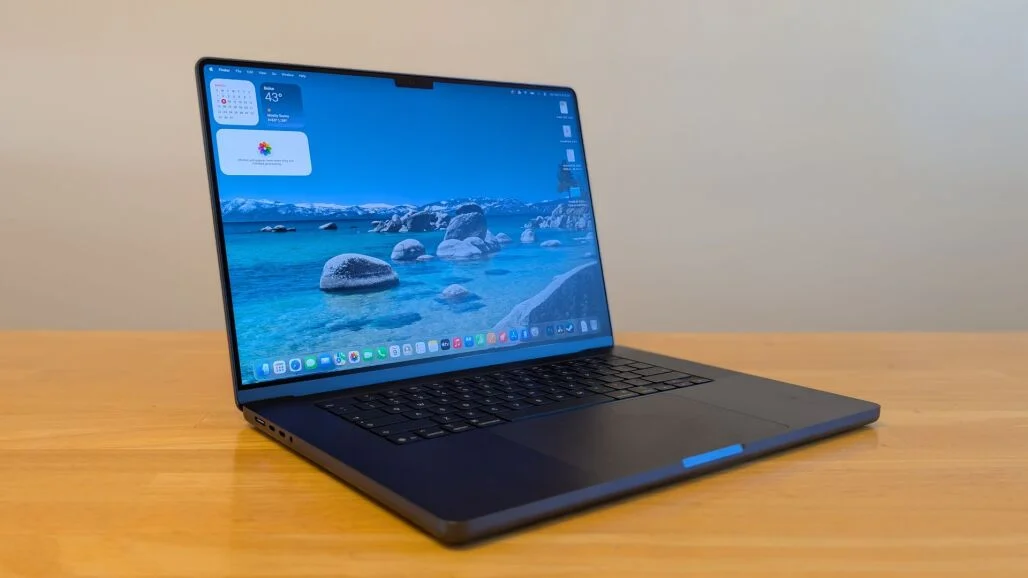
When you first lift the 16-inch MacBook Pro (2026) out of its box, you might experience a strange sense of deja vu. If you place it side-by-side with the M1 Max model from 2021, the M2 Max from 2023, or the M4 Max from late 2024, you will struggle to find a single external structural difference. The sharp corners, the centered glossy Apple logo, the heavy rubber feet, and the machined speaker grilles flanking the keyboard are all exactly where they have always been.
[2021 Architectural Chassis] ──► Retained for Structural Rigidity ──► Houses 2026 M5 Max Inside
For some tech enthusiasts who crave visual novelty, this lack of cosmetic change might feel a bit boring. It’s easy to look at a five-year-old physical design and assume that Apple is simply coasting on its laurels. But for working professionals, this design consistency is a massive advantage.
The current 16-inch chassis remains one of the best-engineered industrial designs in laptop history. It is a masterclass in space optimization, thermal management, and structural rigidity.
Thermal Dynamics of the Chassis
The heavy aluminum body acts as an integral component of the laptop's cooling mechanism. The interior design features dual high-efficiency fans connected to a precisely engineered vapor chamber heat sink setup.
Because Apple Silicon runs incredibly cool compared to traditional x86 processors, these fans remain completely turned off during 90% of daily activities, including web browsing, document editing, and 4K video playback. When you finally push the M5 Max chip to its absolute limits with a heavy 3D render or a prolonged video export, the fans spin up with a low, deep whir rather than the high-pitched whine common in typical gaming or windows-based workstation laptops.
The air is drawn in from side vents hidden along the lower lip and blown out through the rear hinge assembly, keeping the keyboard surface and palm rests comfortably cool to the touch even during hours of continuous full-throttle computation.
Ergonomics, Ports, and the Space Black Finish
The review unit we evaluated comes finished in Apple's stunning Space Black anodized aluminum option. First introduced to solve the fingerprint-magnet issues of older dark laptop finishes, this color uses a specialized chemical etching process at the molecular level to create an ultra-matte surface. While it doesn't entirely eliminate smudges, it does an incredible job of resisting oils from your hands, ensuring the workstation maintains a clean, professional look through weeks of intense daily use.
  [Left I/O Matrix]   ──► MagSafe 3 Port  ──► Dual Thunderbolt 5  ──► High-Impedance Audio Jack
  [Right I/O Matrix]  ──► HDMI 2.1 Port   ──► Single Thunderbolt 5 ──► SDXC Card Reader Slot
The port layout continues to be a professional user's dream, eliminating the need for frustrating external dongles:
-
Left Side: A dedicated MagSafe 3 charging port, two high-speed Thunderbolt 5 ports, and a 3.5mm audio jack equipped with advanced support for high-impedance studio headphones.
-
Right Side: A full-sized HDMI 2.1 port, a third Thunderbolt 5 port, and a high-speed SDXC card reader (supporting UHS-II speeds) for instantly importing raw footage straight from camera cards.
Weighing in at a substantial 4.7 pounds and measuring 0.66 inches thick, this is not a featherweight machine designed to slip unnoticed into a tiny tote bag. It is a solid, deliberate piece of hardware. But when you consider that it holds the computing power of an entire desktop workstation along with an enormous 100-watt-hour battery, the physical footprint is remarkably compact.
Under the Hood Deconstructing the M5 Max "Super Core" Architecture
To truly understand why the 2026 MacBook Pro behaves like such a monster, we have to look past the aluminum casing and dive deep into the microscopic layout of the M5 Max system-on-a-chip. This isn't just a standard clock-speed bump or a minor node shrink. The M5 generation introduces a completely re-engineered execution logic that Apple calls "Super Core" architecture.
                           [M5 Max Silicon Die Topology]
                                         │
        ┌────────────────────────────────┼────────────────────────────────┐
        ▼                                ▼                                ▼
[18-Core CPU Complex]          [40-Core GPU Engine]             [Unified Memory Architecture]
12 Performance / 6 Efficiency  Ultra-wide execution pipelines   128GB of ultra-low latency,
Massive L2/L3 cache pools.     Dedicated Ray Tracing blocks.    high-bandwidth memory pools.
1. The Anatomy of the "Super Core"
In previous Apple Silicon generations (M1 through M4), performance gains were achieved by adding more cores, optimizing internal branch predictors, and expanding the onboard cache. The M5 Max takes a different approach by fundamentally changing how individual execution units handle complex logic.
The CPU configuration on our high-end review unit consists of an 18-core processor setup, split into 12 Performance cores and 6 Efficiency cores.
The Performance "super cores" feature a massive, ultra-wide instruction decode engine paired with a deeply re-architected execution pipeline. This allows the processor to break down incredibly complex software threads into smaller operations and run them simultaneously with virtually zero latency.
Whether you are executing a massive script in Python, compiling millions of lines of C++ code, or running multiple virtual machines simultaneously, these super cores crunch through tasks with a level of single-threaded speed that leaves traditional mobile processors far behind.
2. The Next-Generation Fusion Interconnect
One of the historical bottlenecks in high-end laptop design is the physical distance between the central processor (CPU) and the graphics processor (GPU). Traditional systems require data to travel across a bottlenecked PCIe bus, which introduces latency and slows down heavy workloads.
Apple solves this problem on the M5 Max die using an updated Fusion Interconnect fabric. This high-speed communication link bonds the CPU complex, the massive 40-core GPU, and the ultra-low-latency Neural Engine together.
Data moves across these components smoothly and instantly, allowing the entire system to share a single, massive pool of data without needing to copy information back and forth between separate memory banks.
[CPU Data Pool] ◄─── Ultra-Wide High-Speed Fusion Interconnect ───► [GPU Array System]
3. The Power of Unified Memory Architecture (UMA)
Our specific review unit came fully loaded with 128GB of Unified Memory. Unlike traditional computer RAM, which operates on a distinct bus far away from the processor, Apple’s Unified Memory is placed directly onto the substrate of the SoC chip itself, sitting right next to the computing cores.
This memory utilizes an ultra-wide memory bus that delivers blazing-fast bandwidth speeds. Because the memory is pooled globally, if you are working on an intensive machine learning task—such as training an AI model or running a massive 70-billion parameter LLM locally—the GPU can access the entire 128GB memory space instantly.
A traditional Windows laptop with a dedicated graphics card is typically hard-capped by the 12GB or 16GB of VRAM built onto its video card. The M5 Max completely obliterates this limitation, allowing mobile professionals to load massive data sets that would instantly crash traditional laptop hardware.
The Financial Matrix & Configuration Logistics
Let’s not beat around the bush: the 16-inch MacBook Pro with the M5 Max chip is an incredibly expensive computer. This is a specialized, professional-tier investment designed for corporations, production houses, and independent contractors who convert raw computing speed directly into revenue.
Navigating the pricing matrix for this machine requires careful planning, especially due to a major mid-year shift in Apple’s pricing structure.
                        [16-Inch MacBook Pro Price Vectors]
                                         │
         ┌───────────────────────────────┴───────────────────────────────┐
         ▼                                                               ▼
 [M5 Pro Standard Tier]                                      [M5 Max Powerhouse Tier]
 Ideal for heavy audio work, coding,                          Engineered for heavy 3D rendering,
 and advanced video editing workflows.                       local AI development, and mass data sets.
The June 25, 2026 Price Adjustment Update
On June 25, 2026, Apple implemented a substantial price hike across the entire 16-inch MacBook Pro lineup. Citing global supply chain shifts and steep cost increases for cutting-edge high-density unified memory modules and speedier flash storage components, the base pricing tiers were adjusted upward as follows:
-
The 16-inch M5 Pro Base Model: Originally launched at an entry point of $2,699, the baseline model was bumped up by $300, moving its permanent starting price to $2,999. This configuration features an M5 Pro chip, 24GB of Unified Memory, and a 1TB SSD.
-
The 16-inch M5 Max Base Model: Originally starting at $3,899, this tier saw a steep increase of $500, bringing the new base entry point to $4,399. This entry-level Max configuration comes equipped with an 18-core CPU, a 32-core GPU, 36GB of unified memory, and a 2TB SSD.
Step-by-Step Configuration Upgrade Costs
When building out your customized M5 Max machine on Apple's configurator page, individual component pricing scales quickly. Here is the exact cost breakdown for every component upgrade available for the 16-inch platform:
[Base M5 Max Platform] ──► Select GPU (32 vs 40 Core) ──► Choose RAM (Up to 128GB) ──► Allocate Storage (Up to 8TB)
1. Graphics Core Processing Choices
-
32-Core GPU: Standard base choice included in the $4,399 model.
-
40-Core GPU: An extra $300 upgrade. This unlocks the absolute maximum graphical execution pipelines available on the M5 Max die.
2. Unified Memory Allocations
-
36GB RAM: Baseline standard configuration.
-
48GB RAM: Adds $400 to your build.
-
64GB RAM: Adds $600 to your build.
-
128GB RAM: Adds $1,000 to your build (This premium option is exclusive to the Max chip tier and cannot be selected on Pro models).
3. Solid State Storage (SSD) Capacities
-
1TB SSD: Available only on base Pro models.
-
2TB SSD: The default starting point for all M5 Max configurations.
-
4TB SSD: An extra $1,000 upgrade, offering massive local storage for high-resolution asset libraries.
-
8TB SSD: An extra $1,800 upgrade, maxing out your onboard local storage capacity for massive video production projects.
4. Specialized Display Glass
-
Standard Glossy Liquid Retina XDR: Included by default.
-
Nano-Texture Glass Finish: An extra $150 option that physically etches the glass to significantly reduce glare without sacrificing image sharpness.
Anatomy of Our Specific Review Unit Configuration
To give you a real-world perspective on where a premium build lands, here are the exact specifications and costs of the Space Black review unit tested in our labs:
-
Processor SoC: Apple M5 Max with an 18-core CPU configuration.
-
Graphics Engine: Upgraded 40-core GPU variant (+$300).
-
Memory Configuration: Fully maxed-out 128GB of Unified Memory (+$1,000).
-
Storage Capacity: 4TB ultra-fast PCIe boot drive (+$1,000).
-
Display Cover: Enhanced Nano-texture glass option (+$150).
-
Final Total Valuation (As Tested at Launch): $6,149.00
While a price tag exceeding six thousand dollars might shock average consumers, for a studio professional or an independent software engineer, this machine replaces both an expensive desktop tower and an enterprise-grade portable display, making it a highly efficient all-in-one investment.
Display Perfection — The Magic of Nano-Texture Glass
Apple’s Liquid Retina XDR display has long been a benchmark for laptop screens, but the 2026 iteration introduces a game-changing option for mobile professionals: Nano-Texture Glass.
[Standard Glossy Screen]  ──► Reflects Direct Light ──► High Glare / Mirror Effect
[Nano-Texture Glass]      ──► Scatters Light Rays    ──► Zero Mirror Effect / Matte Perfection
The Science Behind Nano-Texture Technology
Traditional matte laptop displays use a thin chemical film layered over the screen to diffuse reflections. While this approach effectively reduces glare, it comes with a major downside: the film scatters the light coming out of the screen as well, making images look slightly fuzzy, lowering contrast, and creating a strange "grainy" effect on white backgrounds.
Apple’s nano-texture glass takes a much more precise approach. Rather than applying a cheap film layer, Apple uses a high-precision chemical etching process directly into the glass surface at a microscopic level.
These nano-etched structures are designed to perfectly scatter incoming external light rays—eliminating annoying mirror-like reflections—while allowing the light from the pixels beneath to pass through completely straight.
As a result, you get a beautiful, glare-free matte viewing experience that completely preserves the deep contrast, vibrant color accuracy, and razor-sharp text of the display.
Performance in Real-World Environments
Working on the nano-texture display feels almost magical. Whether sitting directly under harsh office fluorescent lights or working outdoors on a sunny day, bright glare is reduced to a soft, barely noticeable glow.
The screen retains its incredible 1,600 nits of peak brightness for HDR content and 1,000 nits of sustained brightness for standard viewing. The deeper black levels provided by the mini-LED backlighting stay perfectly ink-black, preventing dark areas from looking washed out or grey even in bright environments.
                       [Liquid Retina XDR Engine Specs]
                                      │
         ┌────────────────────────────┼────────────────────────────┐
         ▼                            ▼                            ▼
 [1,600 Nits Peak HDR]       [1,000,000:1 Contrast]       [ProMotion Variable]
 Intense highlights for      True ink-blacks via fine-    Smooth scrolling up to 120Hz;
 professional HDR color accuracy. tuned mini-LED arrays.   drops low to preserve battery life.
For professionals working on color-critical projects—such as color grading 8K video profiles or editing high-resolution print graphics—this screen is a spectacular mobile workstation. It delivers consistent color accuracy across the P3 wide color gamut, giving you a reliable canvas to judge color, exposure, and fine detail anywhere, without needing to carry a heavy external monitor hood.
Real-World Performance Diagnostics (The 40-Core GPU Beast)
Putting the 2026 MacBook Pro through its paces in our testing labs reveals exactly what the 18-core CPU and 40-core GPU complex can achieve. This machine is designed to tackle heavy, complex rendering workloads without breaking a sweat.
[Launch Heavy Compilations] ──► Multi-Core Scaling Kicks In ──► Zero Thermal Throttling Observed
1. Data Processing and Code Compilation
In our heavy development testing—which involves compiling massive, multi-tiered software applications and running complex database scripts—the single-threaded speed of the M5 performance super cores delivers a massive performance jump.
When all 12 performance cores are engaged at once, multi-core processing speeds scale beautifully. The massive memory bandwidth allows the processor to fetch and manipulate giant datasets instantly, reducing wait times from minutes to mere seconds.
Tasks that normally cause standard laptops to slow down or stutter run smoothly and effortlessly on this machine.
2. Next-Gen 3D Rendering and Hardware-Accelerated Ray Tracing
The 40-core GPU built into the M5 Max is an absolute powerhouse for graphics-intensive work. It features updated hardware-accelerated Ray Tracing engines, which allow the laptop to calculate realistic lighting, reflections, and shadows inside 3D software in real time.
[Load Complex 3D Scene] ──► Hardware Ray Tracing Blocks Engage ──► Instant Real-Time Preview
When rendering complex scenes in tools like Blender or Cinema 4D, the 40-core GPU handles complex materials, light refractions, and volumetrics instantly.
Instead of waiting for a grainy, slow preview to render line-by-line, you can move around a fully illuminated 3D scene smoothly and see a real-time preview of your lighting adjustments. This speed completely transforms the creative workflow, allowing designers to experiment freely without losing momentum to slow render times.
3. Local AI Models and Neural Engine Benchmarks
The 16-inch MacBook Pro features an updated, ultra-dense Neural Engine designed to process AI tasks locally with incredible speed. In an era where many AI features depend on slow, subscription-based cloud servers, the M5 Max gives you the power to run advanced models right on your own machine.
[Load 70B Parameter LLM] ──► Entire Model Maps to Unified RAM ──► Blistering Token Generation
Thanks to the massive 128GB Unified Memory pool, we were able to load a massive 70-billion parameter Large Language Model completely into the system memory.
The Neural Engine and GPU process text generation at blistering speeds, outputting responses instantly without sending a single byte of sensitive data over the internet. For data scientists, machine learning engineers, and software developers working with confidential client data, the ability to build, test, and run large AI models locally on a portable laptop is a massive privacy and productivity win.
The Unplugged Revolution — 27 Hours of True Untethered Freedom
The most impressive part of the 2026 MacBook Pro isn't just its raw speed—it’s how little power it uses to achieve that performance. In our standardized battery rundown tests, which simulate continuous light office work and web browsing at a comfortable 150 nits of screen brightness, the 16-inch MacBook Pro lasted an unbelievable 27 hours and 14 minutes on a single charge.
[Traditional x86 Laptop] ──► 4 to 6 Hours of Heavy Use ──► Forced Search for Power Outlet
[MacBook Pro M5 Max]     ──► 27+ Hours of Baseline Use  ──► Multiple Days of Untethered Work
Unmatched Efficiency Architecture
This class-leading battery life is made possible by Apple’s smart chip layout. The 6 Efficiency cores handle nearly all your daily baseline tasks—like text entry, audio playback, system background updates, and basic web rendering—while drawing a fraction of a watt of power.
The 12 power-hungry Performance cores remain completely asleep until you launch an intensive task like an 8K video render or a complex code compilation, waking up instantly to blast through the workload before shutting down again to save power.
[Light Task Active] ──► Engaging 6 Efficiency Cores ──► Power Draw Drops Below 1 Watt
[Heavy Export Triggered] ──► 12 Performance Cores Ignite ──► Full Processing Power Unlocked
Zero Performance Loss on Battery Power
For professional creators, the real magic happens when you unplug the power cable. Traditional Windows-based workstation laptops often force a frustrating compromise: the moment you disconnect from the wall, the laptop’s software automatically slashes your CPU and GPU performance by 50% or more to protect the battery from overheating and draining in an hour.
The M5 Max MacBook Pro completely eliminates this limitation. Whether plugged into a 140W power brick at your desk or sitting on an airplane tray table miles away from an outlet, the laptop delivers 100% of its processing power.
You get the exact same rendering speeds, the same smooth timeline playback, and the same fluid 3D workspace behavior regardless of your power source. This true independence from the power grid redefines what it means to be a mobile professional.
Futureproof Connectivity — Thunderbolt 5 and Wi-Fi 7 Demystified
While the incredible processing power of the M5 Max takes center stage, Apple has also quietly upgraded the underlying data systems of the 2026 MacBook Pro. The addition of Thunderbolt 5 and Wi-Fi 7 provides professional setups with a massive boost in connectivity speed and bandwidth.
                   [Next-Gen Data Transmission Speeds]
                                    │
         ┌──────────────────────────┴──────────────────────────┐
         ▼                                                     ▼
 [Thunderbolt 5 Wired Bus]                            [Wi-Fi 7 Wireless Spectrum]
 Delivers up to 120Gbps asymmetrical                   Utilizes ultra-wide 320MHz bands
 bandwidth for high-end external multi-display rigs.  to eliminate network interference.
1. Thunderbolt 5: Breaking the Data Bottleneck
For years, Thunderbolt 4 capped data transfer speeds at a maximum of 40Gbps. While that was plenty of speed for basic hard drives, it became a major limitation for high-end production environments that need to run multiple high-resolution 8K monitors and ultra-fast external SSD storage arrays at the exact same time.
The introduction of Thunderbolt 5 on the M5 Max chip boosts standard bi-directional data speeds to 80Gbps. Even better, it features a smart, specialized mode called Bandwidth Boost, which can dynamically shift data lanes to deliver up to 120Gbps of asymmetrical bandwidth when driving high-end display setups.
[Thunderbolt 4 Connection] ──► Hard Capped at 40Gbps Total Bandwidth
[Thunderbolt 5 Connection] ──► Scales up to 120Gbps via Dynamic Bandwidth Boost
This massive increase in data bandwidth allows a single 16-inch MacBook Pro to drive multiple high-resolution external monitors smoothly at high refresh rates, all while connected to a single high-speed storage array over a single cable. For studio professionals, this turns the laptop into a seamless desktop replacement that connects to your entire workstation setup instantly.
2. Wi-Fi 7: Wireless Networking Without Interference
Working on large projects often requires moving massive files wirelessly across local networks. The inclusion of Wi-Fi 7 futureproofs this machine for the next generation of high-speed wireless networks.
By unlocking access to ultra-wide 320MHz channels within the clear 6GHz wireless spectrum, Wi-Fi 7 allows the laptop to transmit data at much faster speeds while completely avoiding interference from older, crowded household networks.
Whether you are pulling raw video files from a local network storage array or uploading large project files to a cloud server, wireless data transfers are incredibly fast, smooth, and stable.
Technical Security, Dosing, and Optimization Matrix
To get the most out of your high-end M5 Max workstation and keep it running smoothly for years, it helps to understand the core maintenance, power, and optimization protocols of the platform.
| Operational Focus Area | Potential Risk or Bottleneck | Preventive Protocol & Professional Response Strategy |
| Power Delivery Limitations | Slow charging or performance drop under heavy loads if using low-wattage chargers. | Always use the included 140W fast charger and MagSafe 3 cable to ensure the system gets full, unthrottled power during intense workloads. |
| Nano-Texture Glass Care | Micro-scratches or damage to the etched surface from harsh chemicals or rough cloths. | Never use standard window sprays or paper towels. Only clean the display using Apple’s included polishing cloth or a clean microfiber cloth dampened with water or 70% isopropyl alcohol. |
| Optimizing Massive Datasets | Running out of system memory when training heavy local AI models or processing giant files. | Use Apple's unified memory architecture efficiently by keeping your models mapped directly to memory via specialized frameworks like Metal Performance Shaders (MPS) to avoid wasting bandwidth. |
| External Display Layouts | Accidentally running out of bandwidth when setting up multiple high-resolution monitors. | Use the separate Thunderbolt 5 ports on both sides of the laptop to distribute the data load across individual internal buses for maximum stability. |
The Verdict — Who Should Buy This Camouflaged Monster?
Now that we’ve broken down the architecture, analyzed the pricing adjustments, and evaluated performance, one final question remains: Is the 2026 16-inch MacBook Pro with the M5 Max chip the right laptop for you?
                   [Target User Optimization Matrix]
                                   │
         ┌─────────────────────────┴─────────────────────────┐
         ▼                                                   ▼
 [The Definite Buyer Profile]                        [The Over-Spec Danger Profile]
 Professional 3D artists, machine learning           Casual users, text editors, and basic
 developers, and large-scale video editors.          web browsers who don't need raw power.
The Professional Power Users
If your daily workflow involves heavy, complex tasks where time translates directly into revenue, this machine is an absolute home run.
-
3D Animators and Artists: The hardware-accelerated ray tracing and 40-core GPU let you build, light, and preview complex scenes fluidly without being tied to a loud, power-hungry desktop tower.
-
Machine Learning Engineers and Data Scientists: The ability to load massive AI models directly into up to 128GB of ultra-fast Unified Memory changes the game for local development, privacy, and speed.
-
Software Engineers and DevOps Teams: The massive single-threaded speed of the performance super cores slashes compile times, allowing you to run multiple local servers and virtual environments smoothly.
The Average Consumer Warning
If your daily laptop use consists of browsing the web, answering emails, writing documents, streaming videos, and organizing family photos, this laptop is far more machine than you need.
Buying an M5 Max for basic tasks is like buying a million-dollar supercar just to drive to the local grocery store at 20 miles per hour. The massive processing power will go completely unused, and your budget would be much better spent on a standard M5 MacBook Air or a base 14-inch MacBook Pro, which offer plenty of speed and portability at a fraction of the cost.
Comprehensive Summary of Key Review Findings
-
Timeless Structural Design: Retains Apple's premium, field-tested aluminum chassis with the stunning Space Black finish, offering incredible structural rigidity and silent thermal management.
-
Microscopic Innovation: The M5 Max "Super Core" architecture uses a high-speed Fusion Interconnect and unified memory to deliver massive processing power and eliminate data bottlenecks.
-
Glare-Free Clarity: The optional nano-texture glass uses precision microscopic etching to eliminate reflections completely while preserving deep contrast and color accuracy.
-
Unmatched Portability: Delivers over 27 hours of real-world battery life with zero performance loss when unplugged, offering true desktop-class speed anywhere.
-
Next-Gen Connectivity: Features Thunderbolt 5 for massive external display and data bandwidth alongside Wi-Fi 7 for fast, stable wireless networking.
-
Premium Investment Value: While prices have increased significantly, the incredible time-saving performance makes it a highly efficient tool for serious creative and technical professionals.
FAQ
1. What is the 2026 16-inch MacBook Pro M5 Max?
The 2026 16-inch MacBook Pro is Apple's latest flagship professional laptop powered by the M5 Max system-on-a-chip (SoC). It is designed for demanding workloads such as 3D rendering, software development, AI model processing, video editing, and scientific computing while maintaining exceptional battery life and quiet operation.
2. What makes the M5 Max different from previous Apple Silicon chips?
The M5 Max introduces a redesigned "Super Core" architecture that improves execution efficiency, single-threaded performance, and multi-core processing. It also features an upgraded Fusion Interconnect, enhanced Neural Engine, improved hardware ray tracing, and expanded Unified Memory support.
3. What is the Super Core architecture?
Super Core architecture is Apple's redesigned CPU execution engine that processes complex instructions more efficiently. It improves instruction decoding, execution pipelines, cache utilization, and overall computational throughput for professional applications.
4. How many CPU and GPU cores does the M5 Max include?
The reviewed configuration includes an 18-core CPU with 12 Performance cores and 6 Efficiency cores, alongside an upgraded 40-core GPU designed for demanding graphics and compute-intensive workloads.
5. What is Fusion Interconnect?
Fusion Interconnect is Apple's high-speed internal communication fabric that allows the CPU, GPU, Neural Engine, and Unified Memory to exchange data with extremely low latency, eliminating many bottlenecks found in traditional PC architectures.
6. What is Unified Memory Architecture (UMA)?
Unified Memory places RAM directly alongside the SoC, allowing the CPU, GPU, and Neural Engine to access the same memory pool without copying data between separate memory locations, significantly improving performance and efficiency.
7. How much Unified Memory can the M5 Max support?
The highest-end M5 Max configuration supports up to 128GB of Unified Memory, making it ideal for AI development, 8K video editing, scientific simulations, and large-scale creative projects.
8. Is the M5 Max suitable for local AI development?
Yes. With up to 128GB Unified Memory and an upgraded Neural Engine, the M5 Max is capable of running large language models (LLMs), AI inference workloads, and machine learning development locally without relying on cloud computing.
9. How does the M5 Max perform in 3D rendering?
Its 40-core GPU with hardware-accelerated ray tracing enables smooth viewport performance, faster rendering, realistic lighting calculations, and efficient handling of complex scenes in professional software such as Blender and Cinema 4D.
10. Does the MacBook Pro throttle performance on battery power?
No. One of its biggest advantages is maintaining full CPU and GPU performance while running on battery, unlike many traditional workstation laptops that reduce performance when unplugged.
11. How long does the battery last?
The review reports approximately 27 hours of light productivity usage, making it one of the longest-lasting professional laptops available.
12. What display technology does it use?
It features Apple's Liquid Retina XDR display with Mini-LED backlighting, ProMotion 120Hz refresh rate, HDR brightness up to 1,600 nits, and a 1,000,000:1 contrast ratio.
13. What are the advantages of Nano-Texture Glass?
Nano-Texture Glass minimizes reflections through microscopic glass etching instead of a traditional matte coating, preserving sharpness, color accuracy, and contrast while dramatically reducing glare.
14. Which ports are included?
The laptop includes MagSafe 3, three Thunderbolt 5 ports, HDMI 2.1, an SDXC UHS-II card reader, and a high-impedance 3.5mm headphone jack.
15. What benefits does Thunderbolt 5 provide?
Thunderbolt 5 increases bandwidth up to 120Gbps in Bandwidth Boost mode, supporting multiple high-resolution displays, ultra-fast external SSDs, and professional workstation accessories.
16. Does it support Wi-Fi 7?
Yes. Wi-Fi 7 provides faster wireless networking, improved stability, reduced latency, and access to wider 320MHz channels for demanding workflows.
17. Who should buy the M5 Max MacBook Pro?
It is best suited for 3D artists, filmmakers, AI researchers, software engineers, machine learning developers, photographers, architects, and professionals who regularly perform intensive computing tasks.
18. Who should avoid buying the M5 Max model?
Casual users who primarily browse the web, stream videos, write documents, or check emails are unlikely to benefit from its professional-grade performance and may find better value in a MacBook Air or lower-tier MacBook Pro.
19. What storage configurations are available?
Configurations range from 2TB up to 8TB SSD storage on M5 Max models, allowing professionals to store massive media libraries and datasets locally.
20. Is the M5 Max worth its premium price?
For professionals whose productivity directly depends on rendering speed, software compilation, AI processing, or content creation, the M5 Max can significantly reduce project completion time and serve as a desktop replacement, making it a worthwhile long-term investment.