Insta360 Luna Ultra Review: The New King of Handheld Gimbal Cameras
1 week ago
For the past few years, if you wanted a pocket-sized, stabilized camera for vlogging, travel, or content creation, the conversation started and ended with DJI’s Osmo Pocket series. It was a functional monopoly. But the landscape has shifted dramatically. Rival brand Insta360 has jumped into the ring with the Insta360 Luna Ultra, a premium, dual-lens, 3-axis stabilized powerhouse that doesn't just match its competition—it actively attempts to leapfrog it.
Arriving at an absolute turning point for creators, the Luna Ultra enters the market at a premium price of $769.99. It's a significant investment, especially when compared to older alternatives, but it delivers an array of features never before seen in this form factor: dual Leica-engineered lenses, 8K video capture, and an ingenious detachable screen that pulls double duty as a wireless remote.
Technical Specifications: At a Glance
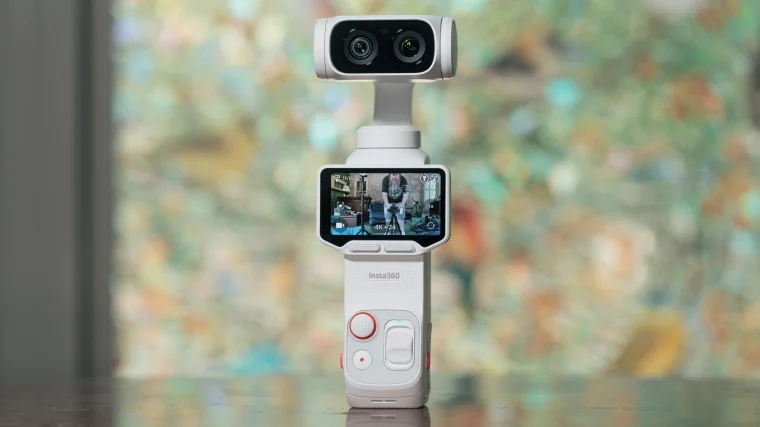
To understand why this camera commands a premium, we have to look under the hood. Insta360 didn't just rehash the standard vlogging camera template; they packed a high-tier imaging pipeline into a remarkably compact frame.
| Specification | Details |
| MSRP | $769.99 (Standard Combo) |
| Dimensions | 6.7 x 2.0 x 1.5 inches (52.4 x 169.9 x 38.5 mm) |
| Weight | 8.3 oz (235g) for Stellar White / 8.2 oz (233g) for Cosmic Black |
| Main Sensor & Lens | 1-inch CMOS, 20mm equivalent, f/1.8 aperture (9cm minimum focus) |
| Telephoto Sensor & Lens | 1/1.3-inch CMOS, 60mm equivalent, f/2.0 aperture (15cm minimum focus) |
| Maximum Video Resolution | 8K at 30fps / 4K at 120fps (10-bit SDR/HDR) |
| Maximum Photo Resolution | 37MP (UltraPhoto mode), 200MP (Scenic Panorama) |
| Internal Storage | 47GB built-in (expandable up to 1TB via microSDXC) |
| Audio Hardware | 4-microphone array (3 on gimbal body, 1 on detachable screen) |
Design and Hardware Innovation
The physical build follows the familiar baton-style form factor popularized by the pocket gimbal category, but the execution feels distinctly premium. Available in Cosmic Black and Stellar White, the camera handles exceptionally well, though its dense engineering results in a reassuring 8.3-ounce weight.
The Dual-Lens Gimbal Paradigm
While previous iterations in this product category relied on single wide-angle lenses—frequently forcing creators to crop digitally and destroy image quality—the Luna Ultra introduces a true dual-lens architecture balanced on its mechanical 3-axis brushless gimbal.
-
The Main Workhorse: A 20mm equivalent f/1.8 optic powered by a massive 1-inch sensor. This focal length is the sweet spot for self-vlogging, environmental framing, and capturing expansive landscape vistas.
-
The Telephoto Specialist: A 60mm equivalent f/2.0 optic utilizing a 1/1.3-inch sensor. This provides a true 3x optical jump, unlocking natural compression and beautiful optical bokeh without the synthetic artifacts of digital enlargement.
A Masterstroke: The Detachable Screen
Easily the most talked-about hardware feature is the removable 2-inch OLED touchscreen. By squeezing the physical clips at the base of the panel, the module pulls entirely free from the camera stem.
Once detached, it shifts effortlessly into a wireless remote control with a low-latency live feed operating over a distance of up to 65 feet (20 meters). This unlocks entirely new shooting methodologies. You can place the camera next to a bird feeder, a skateboard ramp, or a studio set, retreat to a safe distance, and maintain full menu control, framing, panning, tilting, and zooming capabilities.
Even better, the screen module houses its own dedicated microphone, meaning you can narrate your shot directly into the controller while the camera is positioned across the room.
Video Performance and Image Quality
The video core of the Luna Ultra is built around a complex Triple AI Chip system. Dual chips are completely isolated to handle real-time imaging and noise reduction pipelines, while a third 4nm flagship processor manages tracking, stabilization, and camera operations.
Resolution and Framerates
The camera pushes high-fidelity boundaries by offering 8K capture at up to 30fps across both lenses. While 8K might seem like overkill for casual social sharing, it gives desktop editors immense freedom to punch in, reframe, or stabilize further during post-production.
For action-oriented sequences or buttery-smooth cinematic b-roll, switching to 4K at 120fps provides immaculate detail retention. Unlike competing platforms that suffer a severe drop in sharpness at high framerates, the Luna Ultra maintains highly uniform fidelity from standard 24fps all the way up to its 120fps ceiling.
Color Profiles: Leica Aesthetics vs. Raw I-Log
Insta360’s engineering partnership with Leica bears massive fruit here. For creators who want professional-grade color right out of the camera without spending hours in a grading suite, the built-in color styles are stellar. Profiles like Leica Chrome and Cinematic add sophisticated contrast curves and mature color tones that look entirely distinct from standard, oversaturated action-cam footage.
For professional workflows, the inclusion of 10-bit I-Log captures up to 14 stops of dynamic range. This flat profile retains vital information in intense highlights and deep shadows, integrating smoothly into color-managed environments like ACES or custom LUT workflows. It's worth noting, however, that the stylized color looks are restricted to resolutions up to 4K60 and 8K30; they are unavailable during 4K120 or extreme slow-motion recording.
PureVideo: Dominating the Dark
When shooting in low-light environments—such as music venues, nighttime streets, or dimly lit rooms—standard pocket sensors usually devolve into a muddy, noisy mess. The Luna Ultra solves this via PureVideo mode. By leveraging the dedicated dual AI imaging chips, it applies intelligent spatial noise reduction directly to the sensor data. It restricts capture to 4K60 and bypasses I-Log, but the resulting footage is remarkably clean, easily outclassing modern flagship smartphones in resolving detail across dark regions.
Advanced Stabilization and Tracking Modes
A gimbal is only as good as the software driving its motors. The Luna Ultra offers four distinct mechanical stabilization modes designed to match specific kinetic styles:
-
Roll Lock (Default): Keeps the horizon absolutely locked and level while allowing natural pan and tilt movements. This is the optimal configuration for run-and-gun vlogging.
-
Roll & Tilt Lock: Forces both the horizon and the vertical pitch to stay completely static, delivering an immaculate dolly-shot or track-shot appearance as your body moves.
-
FPV & FPV-V: Allows the camera to tilt, roll, and lean into turns organically, mimicking a first-person point of view or an acrobatic drone shot. The FPV-V variant uniquely snaps back to a perfect level position when the joystick is double-clicked.
Subject Tracking Via Deep Track 5.0
By utilizing Deep Track 5.0, subject acquisition is near-instantaneous. Double-tapping any face, animal, or object on the OLED screen instructs the gimbal to lock on. Even when moving rapidly or ducking behind foreground obstacles, the motors smoothly pan and tilt to maintain perfect compositional framing. The system also supports Active Zoom Tracking, which dynamically scales the focal length if a subject moves significantly closer to or further from the lens.
Photography Capabilities
While its form factor screams "video first," the Luna Ultra proves to be a surprisingly adept tool for still photography.
-
Standard Mode: Snaps highly clean 9MP images in both compressed JPG and uncompressed Raw (DNG) formats. This setting is optimal for quick snapshots and low-light environments.
-
UltraPhoto Mode: Maximizes the sensor's capabilities to capture highly detailed 37MP stills, offering plenty of resolution for cropping or physical print layouts.
-
Scenic Panorama: Uses automated gimbal sweeps to construct massive, stitched images. It supports standard 360-degree photography alongside a cinematic 2:1 widescreen panorama option that produces staggering 200MP files.
The raw DNG files provide deep flexibility within editing programs like Adobe Lightroom Classic, allowing you to manipulate highlights and pull out rich shadow details from the 1-inch sensor.
Bundles, Accessories, and Ecosystem
The camera launches with a robust accessory ecosystem designed to satisfy varying tiers of production needs.
[Standard Combo: $769.99]
 ├── Luna Ultra Camera
 ├── 1/4"-20 Extension Handle
 ├── Removable Windguard
 └── Protective Transport Case

[Creator Combo: Price TBD]
 ├── All Standard Combo Items
 ├── Battery Handle (+50% capacity / 65-75 min extra runtime)
 ├── 15mm Wide-Angle Conversion Lens
 ├── Insta360 Mic Pro Wireless System
 └── Zippered Travel Case
The standout item of the Creator Combo is undoubtedly the Insta360 Mic Pro. This wireless transmitter syncs instantly with the camera and features a customizable E-Ink display on its face. Using the companion app, creators can upload their personal brand logo to display on-camera during recordings—a brilliant touch for professional interview setups.
A Crucial Note on Filters: Because the Luna Ultra utilizes a fixed f/1.8 and f/2.0 aperture system, you cannot stop the lens down physically to reduce light transmission. If you want to achieve a proper 180-degree cinematic shutter angle (e.g., shooting at 1/60s shutter speed in broad daylight) or capture long-exposure photos, the magnetic Luna Ultra ND Filter Set ($59.99) is practically mandatory.
Real-World Gripes: Areas for Improvement
No piece of technology is flawless. Despite its status as an Editors' Choice tool, the Luna Ultra has a few distinct quirks that potential buyers need to keep in mind:
-
Cramped Ergonomics: While the 2-inch OLED panel is incredibly bright and gorgeous to look at, its diminutive size makes precise menu navigation a bit finicky for larger fingers. Confirming manual focus on such a small screen can also be challenging.
-
Thermal Accumulation: Due to the processing overhead required to handle 8K compression and dual AI imaging engines, the handle gets noticeably warm during continuous 4K60 or 8K sessions. If you plan to record long, uninterrupted clips, mounting it to a mini tripod or using the extension handle is highly advised.
-
Missing Features: Curiously, Insta360 omitted a dedicated native black-and-white recording profile, meaning monochrome fans will have to handle desaturation entirely in post-production. The software also skips an automated Motion Lapse mode; while you can manually adjust the gimbal during a timelapse, a pre-programmed automated path tool is missing at launch.
-
App Activation: The camera requires immediate smartphone app tethering and activation out of the box before it will let you shoot a single frame. While the app is incredibly robust for mobile editing, forced registration remains a minor annoyance.
Final Verdict: Is It Worth It?
The Insta360 Luna Ultra is an absolute triumph of compact imaging design. By implementing a highly functional dual-lens system, a detachable remote screen, and an exceptional 8K/4K120 processing pipeline, it effectively sets a new high watermark for handheld capture.
For US-based creators navigating shifting availability lines among major camera brands, the Luna Ultra doesn't just step into a vacuum—it claims the crown on its own merits. If you are looking for a singular, pocketable creative weapon that seamlessly transitions between wide-angle vlogging, telephoto filmmaking, low-light event coverage, and high-resolution travel photography, the Insta360 Luna Ultra is unequivocally the best handheld camera available today.
FAQ
1. What is the Insta360 Luna Ultra?
The Insta360 Luna Ultra is a premium pocket-sized 3-axis stabilized camera built for vlogging, travel, filmmaking, and content creation. Unlike traditional single-lens pocket cameras, it introduces a dual-lens system with a 1-inch main sensor and a 1/1.3-inch telephoto sensor, allowing creators to switch between a wide 20mm equivalent view and a tighter 60mm equivalent perspective. It also supports up to 8K video, 4K at 120fps, advanced subject tracking, and a detachable touchscreen that doubles as a wireless remote.
2. What makes the Luna Ultra different from other pocket gimbal cameras?
Its biggest differentiators are the dual-lens gimbal design, the detachable OLED screen, and the high-end imaging pipeline. Most compact stabilized cameras in this category use a single wide-angle lens, but the Luna Ultra offers both a wide and telephoto lens in one compact body. The removable screen can control the camera remotely from up to 20 meters away while displaying a live feed, which makes it far more flexible for solo creators, wildlife shots, and remote framing.
3. What lenses does the Luna Ultra use?
The Luna Ultra uses two built-in lenses:
- Main lens: 20mm equivalent with an f/1.8 aperture and a 1-inch CMOS sensor
- Telephoto lens: 60mm equivalent with an f/2.0 aperture and a 1/1.3-inch CMOS sensor
This setup allows users to capture traditional vlog-style wide footage and also punch in optically for more cinematic framing, portrait-style shots, and distant subjects without relying on poor-quality digital zoom.
4. Is the telephoto lens a true optical zoom?
Not exactly in the traditional sense of a variable zoom lens, but it effectively gives you a second native focal length. Since the camera has a dedicated 60mm equivalent telephoto lens, it provides a genuine optical change in perspective compared to the 20mm lens. That means better compression, more natural subject isolation, and cleaner close framing than cropping into a wide shot digitally.
5. What video resolutions and frame rates does the Luna Ultra support?
The Luna Ultra supports high-end video modes designed for both creators and enthusiasts. According to the article, it can record:
- 8K video at up to 30fps
- 4K video at up to 120fps
- 10-bit SDR and HDR capture
- 4K60 in low-light PureVideo mode
This gives users flexibility for cinematic footage, slow motion, high-resolution reframing, and social media content creation.
6. Is 8K actually useful on a pocket camera?
For many casual users, 8K may be more than necessary, but it is valuable for creators who edit professionally. Recording in 8K allows you to crop, zoom, stabilize, or reframe footage in post-production while still delivering a sharp 4K final export. It is especially useful for travel creators, interview setups, and content creators who want multiple crops from a single take.
7. How good is the Luna Ultra in low light?
Low-light performance appears to be one of the Luna Ultra’s strongest selling points. The combination of a 1-inch sensor, wide aperture, and dedicated AI imaging pipeline allows it to perform far better than most pocket-sized cameras. The article specifically highlights PureVideo mode, which uses AI-based noise reduction to clean up dark footage. This makes it useful for nighttime street scenes, indoor events, concerts, restaurants, and dim studio environments.
8. What is PureVideo mode?
PureVideo is a specialized low-light recording mode designed to improve footage captured in dark environments. It uses the camera’s dedicated AI chips to apply real-time spatial noise reduction and optimize image quality in poor lighting. The trade-off is that it is limited to certain resolutions and bypasses I-Log, but in return it produces much cleaner nighttime footage than a typical compact camera or smartphone.
9. Does the Luna Ultra support log recording for color grading?
Yes. The camera supports 10-bit I-Log, which is intended for professional post-production workflows. This flatter profile preserves more highlight and shadow detail, making it easier to color grade footage in editing software such as DaVinci Resolve, Adobe Premiere Pro, or Final Cut Pro. It is particularly useful for creators who want maximum control over color and dynamic range.
10. What are the Leica color profiles mentioned in the article?
The Luna Ultra includes stylized color modes created in partnership with Leica. These profiles are intended for users who want a polished look straight out of the camera without spending time grading footage manually. The article specifically mentions Leica Chrome and Cinematic, both of which aim to deliver more mature contrast, color balance, and tonal rendering than the oversaturated look often associated with action cameras.
11. Are Leica color modes available in every recording mode?
No. According to the article, the stylized Leica-inspired color profiles are not available in every setting. They are limited to resolutions such as 4K60 and 8K30, and are not available in 4K120 or certain extreme slow-motion modes. This means creators may need to choose between stylized in-camera color and high-frame-rate recording depending on the project.
12. How does the detachable screen work?
The Luna Ultra’s 2-inch OLED touchscreen can be physically detached from the main camera body. Once removed, it becomes a wireless remote controller with a live preview feed. This lets you place the camera somewhere difficult to reach—like on a shelf, beside a road, near a skate obstacle, or across a room—while still controlling framing, gimbal movement, zoom, settings, and recording from a distance.
13. Why is the detachable screen a big deal for creators?
Because it dramatically expands how the camera can be used. Solo creators no longer need to stand directly behind the camera to monitor a shot. You can place the camera at a distance, frame yourself accurately, and control it remotely. It is especially useful for:
- Solo vlogging
- Product shoots
- Cooking videos
- Interview setups
- Wildlife and bird feeder filming
- Fitness demonstrations
- Skateboarding, cycling, or action shots where the camera needs to be placed away from the operator
14. Does the detachable screen have its own microphone?
Yes. One of the more interesting features mentioned is that the removable screen includes its own microphone. That means if the camera is positioned away from you, you can still narrate or speak into the controller while monitoring the shot remotely. This makes the setup more practical for solo productions and off-camera filming situations.
15. How good is the stabilization on the Luna Ultra?
The Luna Ultra uses a true 3-axis mechanical gimbal, which is still one of the best stabilization solutions for smooth handheld video. Unlike electronic stabilization alone, a mechanical gimbal physically compensates for hand movement in real time. The article positions the Luna Ultra as a serious run-and-gun tool, with multiple stabilization modes tailored for different shooting styles.
16. What stabilization modes does the Luna Ultra offer?
The article lists four main stabilization behaviors:
- Roll Lock: Keeps the horizon level while still allowing pan and tilt movement
- Roll & Tilt Lock: Locks both the horizon and vertical pitch for a very stable dolly-like look
- FPV mode: Allows the camera to lean and move more dynamically for immersive movement
- FPV-V mode: Similar to FPV, but can snap back to level with a joystick action
These modes give creators more control depending on whether they want cinematic stability or more energetic motion.
17. What is Deep Track 5.0?
Deep Track 5.0 is the camera’s subject-tracking system. It allows the user to tap a person, pet, or object on the screen and have the gimbal follow that subject automatically. The system is designed to maintain framing even when the subject moves quickly or briefly passes behind obstacles. It can also adjust zoom behavior dynamically when the subject changes distance.
18. Is the Luna Ultra suitable for vlogging?
Yes, it appears to be heavily optimized for vlogging. The wide 20mm lens is ideal for handheld self-recording, the gimbal keeps footage smooth, the microphones support on-camera narration, and the detachable screen makes solo filming easier. It also adds flexibility through the telephoto lens, which is useful for B-roll, establishing shots, and more cinematic storytelling beyond the usual arm’s-length vlog angle.
19. Is the Luna Ultra good for travel creators?
Very much so. Its compact form factor, high-resolution video, stabilized footage, panorama support, telephoto lens, and remote-screen functionality make it well suited to travel shooting. A travel creator could use it for walking narration, architecture, street scenes, food footage, scenic stills, and cinematic B-roll without carrying a large mirrorless setup.
20. Can the Luna Ultra take photos too, or is it mostly for video?
It is clearly designed with video in mind, but it also offers strong still-photo features. The article mentions several photo modes:
- Standard mode: 9MP JPG and Raw (DNG)
- UltraPhoto mode: 37MP stills
- Scenic Panorama mode: up to 200MP panoramic images
This means it can work as a hybrid tool for creators who want both video and still images from the same compact device.
21. What is Scenic Panorama mode?
Scenic Panorama uses the gimbal to automatically sweep and stitch together a wide panoramic image. The camera can create both standard 360-degree panoramas and cinematic 2:1 panoramas. The article notes that these stitched files can reach up to 200MP, which is a very high resolution for landscape and travel photography.
22. Does the camera shoot RAW photos?
Yes. The article states that the Luna Ultra can capture DNG RAW still images, which is valuable for photographers and creators who want more flexibility in post-processing. RAW files preserve more tonal information than JPG files, allowing better recovery of shadows, highlights, and color adjustments in editing software like Adobe Lightroom Classic.
23. How much storage does the Luna Ultra have?
The Luna Ultra includes 47GB of built-in internal storage and also supports microSDXC cards up to 1TB. That gives users flexibility to shoot immediately without a card installed while still allowing substantial storage expansion for longer projects and high-resolution video.
24. Is 47GB of internal storage enough for 8K footage?
It is helpful as a backup or for light use, but it will fill up quickly if you shoot a lot of 8K or 4K120 footage. High-bitrate video consumes storage rapidly, so serious users will almost certainly want a high-capacity microSD card, especially if they plan to use the camera professionally or on extended trips.
25. How many microphones does the Luna Ultra have?
The camera includes a 4-microphone array. According to the article, three microphones are on the main gimbal body and one additional microphone is built into the detachable screen. This setup is intended to improve audio capture for direct-to-camera use and remote narration.
26. Is there an accessory ecosystem for the Luna Ultra?
Yes. The article describes both a Standard Combo and a more advanced Creator Combo, along with add-ons like ND filters and a wireless microphone system. Accessories mentioned include:
- Extension handle
- Windguard
- Protective case
- Battery handle
- Wide-angle conversion lens
- Insta360 Mic Pro wireless system
- ND filter set
This suggests Insta360 intends the Luna Ultra to function as a broader creator platform rather than a standalone gadget.
27. What comes in the Standard Combo?
The Standard Combo includes:
- Luna Ultra camera
- 1/4"-20 extension handle
- removable windguard
- protective transport case
This bundle appears to be the base purchase option for users who want the core camera and a few practical accessories out of the box.
28. What extra gear is included in the Creator Combo?
The article says the Creator Combo adds several production-oriented extras on top of the Standard Combo package, including:
- Battery handle for longer runtime
- 15mm wide-angle conversion lens
- Insta360 Mic Pro wireless system
- zippered travel case
This bundle seems targeted at creators who want an all-in-one starter kit for travel, vlogging, and commercial content production.
29. Why are ND filters considered important for this camera?
Because the Luna Ultra has fixed apertures of f/1.8 and f/2.0, you cannot stop the lens down to reduce light in bright environments. If you want to maintain a cinematic shutter speed like 1/50 or 1/60 in daylight, you need ND filters to cut incoming light. Without them, you may be forced to raise shutter speed too high, which can make motion look harsh and less cinematic.
30. Is the Luna Ultra easy to use for beginners?
It seems accessible for beginners in some ways, thanks to its compact design, touchscreen controls, stabilization, and ready-made Leica color profiles. However, some of its advanced features—such as log recording, frame-rate choices, telephoto framing, and remote monitoring—will be more appreciated by intermediate or advanced creators. The small screen and premium feature set may also make the learning curve steeper than a simpler pocket camera.
31. What are the main downsides of the Luna Ultra mentioned in the article?
The article identifies several drawbacks:
- The 2-inch touchscreen can feel cramped for precise control
- The body can get warm during extended 4K60 or 8K recording
- There is no dedicated black-and-white recording profile
- It lacks a built-in automated motion-lapse path mode
- Initial use requires app activation and smartphone tethering
These are not dealbreakers for everyone, but they are worth considering before purchase.
32. Does the Luna Ultra overheat?
The article does not say it shuts down from overheating, but it does note that the handle becomes noticeably warm during long 4K60 or 8K recording sessions. That suggests creators planning long continuous shoots should pay attention to heat buildup and consider using a tripod, extension handle, or shorter clip-based shooting workflow.
33. Is the small screen a real usability problem?
It depends on the user. For quick framing and basic control, it may be fine, but the article specifically points out that the screen can feel cramped for larger fingers and for tasks like precise menu navigation or manual focus confirmation. If you are used to working on larger displays, it may take some adjustment.
34. Does the camera require app activation before first use?
Yes. According to the article, the Luna Ultra must be activated through a smartphone app before it can be used. While the app itself may be powerful and useful for editing or remote control, mandatory activation can be frustrating for users who prefer a simpler out-of-box setup.
35. Is the Luna Ultra better than the DJI Osmo Pocket line?
The article strongly argues that it is. Its reasoning is based on the Luna Ultra’s dual-lens design, detachable remote screen, high-end 8K and 4K120 recording, low-light improvements, and more flexible creator workflow. Whether it is definitively better for every person depends on price sensitivity, workflow, and whether you need those extra features, but within the article’s framing, the Luna Ultra is positioned as the new class leader.
36. Who is the Luna Ultra best for?
The Luna Ultra is best suited for creators who want a compact but premium all-in-one camera for:
- vlogging
- travel videos
- cinematic B-roll
- remote/self shooting
- event coverage
- social content creation
- hybrid photo and video work
- low-light pocket-camera shooting
It makes the most sense for users who will actually benefit from its premium features rather than someone who only needs a basic casual clip camera.
37. Is the Luna Ultra worth the $769.99 price?
If you need a compact creator camera with premium stabilization, high-end video specs, dual focal lengths, strong low-light performance, and remote shooting flexibility, the price can be justified. If you mainly shoot casual clips for social media and do not need 8K, telephoto framing, log recording, or advanced tracking, it may be overkill. Its value depends on how much you will use the features that set it apart from cheaper alternatives.
38. What is the biggest selling point of the Luna Ultra overall?
Its biggest selling point is that it combines several creator-focused tools that normally require compromises: a pocket-sized body, true 3-axis stabilization, dual native focal lengths, strong low-light processing, 8K video, subject tracking, and a detachable wireless monitoring screen. Instead of being just another pocket gimbal camera, it aims to function like a compact multi-role production tool.